
Blog
What is AI Lead Generation? A Complete Guide for 2026

What is AI Lead Generation? A Complete Guide for 2026

Last Updated on: Oct 25, 2026
•
5 min read
Summarize with

Since ChatGPT, Claude, and Gemini entered the picture, AI lead generation has become a hot topic among sales teams, SDRs, GTM teams, and agencies.

Everyone seems to be talking about it. But what does it actually mean?

You might have these questions in your mind.

Is it about using AI to find email addresses, research companies, and identify buying signals? Or can AI handle the entire lead generation process, from finding prospects to qualifying leads?

A quick search on Google or ChatGPT can leave you with more questions than answers.

Different tools and experts explain AI lead generation in different ways. That makes it hard to know what the topic actually involves or means.

So, I explored the topic to separate the hype from the practical use cases.

In this guide, I'll explain what AI lead generation means, how it works, and how to use it to find, research, and qualify potential customers.

What is AI Lead Generation?

AI lead generation uses artificial intelligence to find and research potential customers. It helps sales teams collect contact details, qualify leads, and identify promising prospects.

In B2B sales, AI helps find companies that match the ideal customer profile (ICP). Depending on the tool, it can also enrich contact data, assess buying signals, and personalize outreach.

For example, a sales team selling CRM software could use AI to find US companies hiring sales representatives. It could then identify their sales leaders and gather contact details for outreach.
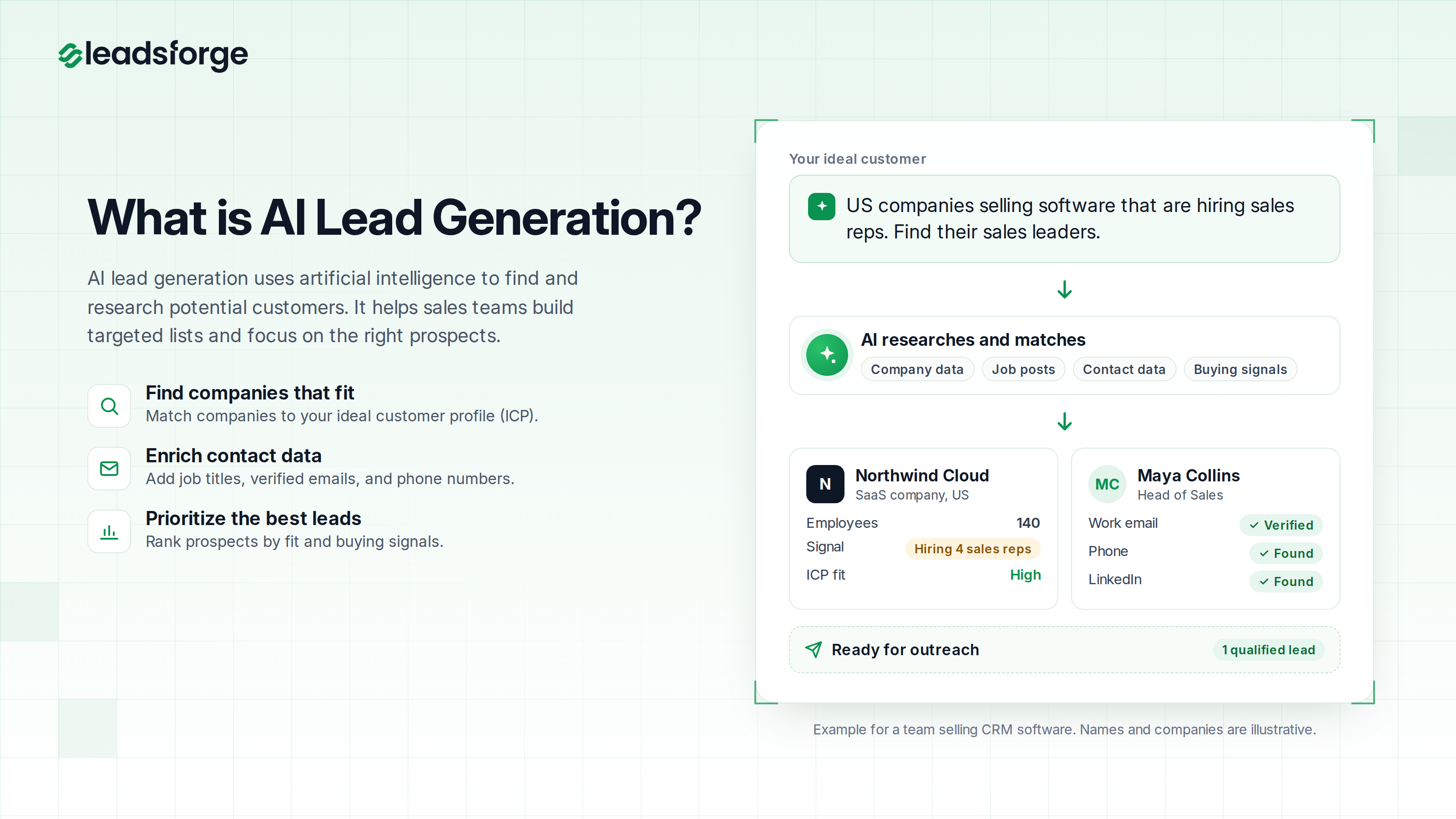
What is AI lead generation: AI turns an ideal customer description into a qualified lead
This image shows how AI turns an ideal customer description into a qualified lead

Difference Between Traditional and AI Lead Generation

Traditional B2B lead generation relies on manual research. A rep picks filters, exports a list, and then looks up missing emails in a second tool. The work is slow, and the list often goes out of date before the campaign ends.

Traditional vs AI lead generation compared side by side
This image shows how traditional and AI lead generation compare

AI-driven lead generation removes most of these steps from the sales process. The table below shows where the two approaches differ.

Scroll sideways to see every column.

Traditional lead generation compared with AI lead generation
AreaTraditional lead generationAI lead generation
How the search worksReps stack filters or write boolean queries.The AI builds the search from a one-sentence ICP, and filters narrow it down.
Finding similar companiesReps research similar companies by hand.Lookalike search finds companies similar to your best customers.
Contact detailsReps look them up in a separate tool.The same tool finds them, often from several providers.
TimingReps contact the whole list in the same order.The AI ranks companies by buying signals such as funding or hiring.
Skills neededReps need to know how each filter works.Reps only need to know what the ideal customer looks like.
Main riskResearch is slow, and lists go out of date.Results can look right and still need checking.

Even so, filters still have a place. When I know exactly who I want, a filter is faster than writing a sentence, so I often use both together.

How Does AI Lead Generation Work?

AI lead generation tools help sales teams find potential customers, research companies, enrich contact data, and prioritize leads. The process typically follows five steps, from identifying target prospects to reaching out to qualified leads.

How AI lead generation works in five steps
This image shows the five steps of AI lead generation

1. Collect Data

The process starts with defining the target audience. AI lead generation tools search company and contact databases for details such as industry, company size, location, and technology use. Depending on the tool, they may also identify signals such as new funding, hiring activity, and leadership changes.

2. Find Matching Prospects

The tool uses the target criteria to find relevant companies and contacts. Some AI lead generation tools let sales reps describe their ideal buyer in plain language. For example, a search might target Heads of Sales at US software companies with 50 to 200 employees that are hiring SDRs. Reviewing the search criteria helps ensure the results match the intended audience.

3. Enrich Leads

After finding prospects, the tool can add missing details, such as job titles, work email addresses, phone numbers, and company information. With waterfall enrichment, it checks multiple data providers in sequence to find the required information. Email verification can then help identify invalid addresses.

4. Score and Prioritize Leads

AI lead generation tools can rank prospects based on their fit with the ideal customer profile (ICP) and available buying signals. These signals may include hiring activity, new funding, or technology changes. Sales teams can also apply their own rules, such as prioritizing companies within a specific employee range.

5. Reach Out to Prospects

Qualified leads can be sent to an outreach tool for personalized email sequences and follow-ups. Before launching a campaign, verify contact details and review AI-generated messages. Human review remains important for assessing lead quality, handling replies, and building relationships.

Important: AI lead generation tools can help find and prioritize promising leads, but they cannot guarantee that a prospect is ready to buy. Results depend on data quality, accurate targeting, and human judgment.

How Does AI Improve Lead Generation?

AI improves lead generation by taking over the slow, manual parts of the work. People still decide who to target and what to say.

With AI tools, sales teams spend far less time on research and more time on the most promising leads. Here are the five biggest improvements I see:

  • Saves time: Building a list by hand means copying names from LinkedIn, looking up emails, and checking each company's website. AI does this research in the background, so reps can spend their day on calls and replies.
    ‍
  • Improves data quality: AI finds companies that filters would miss, such as lookalikes of your best customers. It also verifies each email, which keeps bounces low and protects your sender reputation.
    ‍
  • Shows who to contact first: AI can rank leads based on fit and timing. A company that matches your ICP and just posted five SDR roles moves to the top of the list.
    ‍
  • Makes personalization easier: AI writes a first line for each prospect from the details it found, such as a new hire or a known pain point. This makes personalized outreach possible without writing every line by hand.
    ‍
  • Lets one person do more: When AI handles the research, a single rep can build lists for a whole sales team.

What are the Types of AI Lead Generation?

There are seven main types of AI lead generation. Each type handles a different part of the work, from finding leads to booking meetings.

Seven types of AI lead generation, from lead discovery to AI agents
This image shows the seven types of AI lead generation

1. Lead Discovery

Lead discovery is how AI finds new leads that match your ICP. It works in three main ways, and each one suits a different situation.

Scroll sideways to see every column.

Three AI lead discovery methods and when to use each
MethodHow it worksUse it when
Chat-based searchA one-sentence description of your buyer becomes the search.The right filters for a new market are still unclear.
Lookalike searchThe AI finds companies similar to your best customers.The best customers share traits that are hard to describe with filters.
Competitor audience searchThe AI returns the followers of a competitor’s LinkedIn page.The category is crowded, and the best prospects already know the problem.

In my experience, lookalike search is the fastest way to identify similar companies when your customer list shows a clear pattern. Chat-based search, on the other hand, is better for testing a new market.

Competitor audience search needs extra care. A list of company page followers on LinkedIn and other social media platforms also includes job seekers and the competitor's own staff. Filter it by role before you reach out.

2. Lead Enrichment

Lead enrichment adds the missing details needed to contact each lead. AI matches records across data providers and picks the verified result.

For cold email, a verified work email is often enough. Phone numbers usually cost more to find, so add them only for the leads your team plans to call.

One thing to watch out for is catch-all domains. These company domains accept mail sent to any address, so no tool can fully confirm that a specific inbox exists. I send to catch-all addresses in small batches and watch the bounce rate.

3. AI Lead Scoring

AI lead scoring, also called predictive lead scoring, gives each lead a score based on how closely it matches the customers you already win. A higher score means a closer match, so the sales team contacts that lead first.

Older scoring models add points for fixed rules, such as 10 points for a VP title. AI scoring uses predictive analytics to check more details at once, such as company size and recent news. It can also check what the company sells.

In practice, most scores combine fit and timing. Fit shows how well a lead matches your ICP, and timing shows whether the company has a reason to buy now. Automated lead scoring also updates these scores as new signals appear.

4. Intent-Based Targeting

Intent-based targeting finds companies that may be ready to buy. It relies on buying signals, which are events that suggest a company has a new need.

There are two kinds of intent data. First-party intent comes from your own channels, such as pricing page visits or demo requests. Third-party intent comes from outside sources, such as funding news and job posts.

Common buying signals include new funding and open roles. Leadership changes and acquisitions can also point to a new need. These signals give reps something specific to mention in the first line of a message.

5. AI Chatbots

AI chatbots work on a company's website and landing pages, where they help capture inbound demand. A chatbot answers questions from website visitors, asks a few qualifying questions, and collects contact details.

Good qualifying questions are short and easy to answer. A chatbot might ask about company size and the visitor's role, then send qualified visitors to a rep or a booking page.

Automating lead qualification this way helps most when visitors arrive outside working hours. Keep in mind that a chatbot only helps when a website already gets steady traffic.

6. AI Personalization

With AI personalization, each prospect gets a message based on the details in your lead list. Teams use it to create personalized outreach campaigns without writing every message by hand. A message can mention the prospect's role, company news, or recent LinkedIn activity.

Personalization works best when the detail connects to your offer or to the prospect's pain points. A note about new SDR hires fits a sales training offer, but a note about the prospect's favorite sports team does not.

Multichannel sequences take this further by combining email and LinkedIn. If a connection request is not accepted, the sequence can switch to email instead.

7. AI Agents

An AI agent runs the whole lead generation workflow with little input from a person. The agent finds and enriches leads, writes messages, and books meetings.

These agents are often called AI SDRs. They can work at any hour and handle replies as they come in.

An AI agent works best once a team has a clear ICP and a tested offer. If you are still figuring out who buys, it makes sense to start with your own team.

How Do You Target the Right Leads With AI?

In my experience, a short list of the right sales leads gets more replies than a long list of potential leads that only loosely match. These are the six steps I follow:

  1. Define your ICP: Look at the customers you won in the last year and ask which ones are most alike, closed fastest, and paid the most. Then write your ICP in one specific sentence, such as "US software companies with 50 to 200 employees that sell to enterprise customers."
    ‍
  2. Segment your ICP: Each segment has a different problem, so it needs its own list and message. A sales training company might separate teams hiring their first SDRs from larger teams trying to cut ramp time.
    ‍
  3. Ask custom questions: Let AI check details that no filter covers, such as "Does this company sell to enterprise customers?" Then drop the companies that match your filters but not your offer.
    ‍
  4. Add buying signals: Pick a signal that connects to your offer, such as new SDR roles for a sales training product. Reach out while the event is recent, because signals lose value over time.
    ‍
  5. Rank by score: Send high-scoring leads to a rep or your main sequence. Put low-scoring leads into a lighter nurture sequence until a buying signal appears.
    ‍
  6. Track and improve: Measure bounce rate, reply rate, and meetings booked for each list. A high reply rate with few meetings usually means the message works but the fit is off.

What are the Benefits of AI Lead Generation?

AI lead generation helps businesses identify suitable prospects, qualify leads, and manage outreach with less manual work. Here are seven key benefits:

  • Finding better-fit leads: AI analyzes company details, customer data, and buying signals to identify prospects that match the ideal customer profile (ICP). Better targeting helps businesses focus on relevant contacts.
    ‍
  • Improving conversion rates: Relevant outreach and timely follow-ups can increase the chances of getting a response and converting leads. AI helps identify promising prospects and tailor messages to their needs.
    ‍
  • Speeding up lead qualification: AI can ask qualifying questions, assess responses, and route sales-ready prospects to the right person. Chatbots can handle initial inquiries and schedule meetings, reducing delays in the qualification process.
    ‍
  • Personalizing outreach at scale: By using details such as job titles, company information, and prospect behavior, AI can suggest relevant emails and messages. Reviewing the content before sending helps keep communication accurate and appropriate.
    ‍
  • Reducing manual work: Tasks such as prospect research, data entry, contact enrichment, and lead scoring can be automated with AI. The saved time can go toward calls, follow-ups, and relationship building.
    ‍
  • Lowering lead acquisition costs: Better targeting and automated qualification can reduce spending on irrelevant prospects. Actual savings depend on data quality, software costs, and how well the lead generation process is managed.
    ‍
  • Improving lead nurturing and data quality: AI can schedule follow-ups based on prospect activity, enrich contact records, and identify invalid email addresses. Accurate contact details and timely communication help businesses maintain relationships and focus on promising opportunities.

What are the Use Cases of AI Lead Generation?

AI lead generation helps teams find potential customers, qualify leads, and improve outreach. Here are six common use cases:

  • B2B prospecting: Sales development representatives (SDRs) use AI to find companies that match their ideal customer profile (ICP). They can filter by industry, company size, hiring activity, or recent funding to build targeted prospect lists.
    ‍
  • SaaS sales: SaaS companies use AI to find businesses similar to their best customers. They can then prioritize prospects based on company growth, hiring activity, and other relevant signals. Founders can also test different ICPs to see which audience responds best.
    ‍
  • Retail and e-commerce: Companies selling to retailers and e-commerce brands use AI to find businesses that fit their target audience. A local business search helps find shops by location and business type.
    ‍
  • Account targeting: Sales teams use AI to identify decision-makers at target companies. They can prioritize accounts based on company fit and buying signals. This approach supports account-based marketing (ABM).
    ‍
  • Inbound qualification: When a prospect requests a demo, AI can enrich their contact record with details such as job title and company size. Lead scoring helps sales teams decide which requests to follow up on first. A data enrichment API can add these details to existing systems.
    ‍
  • Campaign improvement: Sales teams analyze campaign results to see which audiences and messages generate more replies. They can use A/B testing to compare email versions and improve future campaigns.

5 Best AI Lead Generation Tools

I picked these five AI-powered tools because they cover the most common AI lead generation jobs. The table below compares them side by side.

Scroll sideways to see every column.

Five AI lead generation tools compared by audience, main strength, and starting price
ToolBest forMain strengthStarting price (October 2026)
ApolloStartups and small sales teamsAn AI sales platform with a contact database and email sequencesApollo has a free plan. Paid plans start at $49 per user per month with annual billing.
ClayRevOps and growth teamsCustom enrichment workflows that combine multiple providersClay has a free plan. Paid plans start at $185 per month, or $167 per month with annual billing.
ZoomInfoEnterprise sales and marketing teamsLarge company and contact databaseZoomInfo has a free Lite plan. Paid plans have a custom quote.
LushaIndividual sales repsQuick contact lookups while browsing LinkedInLusha has a free plan with 40 credits a month. Paid plans start at $49.90 per month.

These prices come from each vendor's official pricing page. Each of these lead generation AI tools has a free plan or free credits, so test the AI features before you pay.

How Do You Choose the Right AI Lead Generation Tool?

The table above is a good starting point, but the right tool depends on the job you need it to do. Check these nine points before you pick one:

  • Know your main need: Decide if you need to find new leads, enrich a list you already have, or score leads in your CRM.
    ‍
  • Compare search options: Check if the tool offers chat-based search, filters, and lookalike search.
    ‍
  • Check data sources: Ask if it uses one data provider or checks several through waterfall enrichment.
    ‍
  • Confirm email verification: Make sure it verifies emails before you pay for them, so you get accurate contact information.
    ‍
  • Review signals and scoring: See which signals it tracks and if you can add your own scoring rules.
    ‍
  • Review integrations: Check that it connects to your CRM and outreach tools. Look for API or MCP access if you use AI agents.
    ‍
  • Understand the pricing: Compare per-user and credit-based pricing. Check what a phone number costs compared with an email.
    ‍
  • Check data privacy: Look for a published data processing agreement and clear data sources.
    ‍
  • Test it yourself: Run the same ICP in two or three tools and compare the first 50 results by hand. A demo shows the tool at its best, but your own test shows how it works for you.

How Do You Build an AI Lead Generation Strategy?

Once you have picked your tools, the next step is to put everything together. On a small AI lead generation team, one AI lead generation specialist can run this whole workflow. These are the eight steps I use:

  1. Set a goal: Start with a number, such as meetings booked per month, and work backward. For example, if one in 50 contacted leads books a meeting, 10 meetings means contacting about 500 leads.
    ‍
  2. Choose your audience: Use your ICP and segments to list the job titles you want to reach. Share this list with your marketing and sales teams, so your marketing strategy and outreach target the same people.
    ‍
  3. Pick data sources: Choose a source that verifies emails and checks more than one provider. Ask each vendor where its data comes from and if it signs a data processing agreement.
    ‍
  4. Select tools: Map each job to one of your sales tools, from lead search and enrichment to outreach and mailbox warmup. Tools that connect directly save you from exporting and uploading CSV files.
    ‍
  5. Build the workflow: Remove duplicates, run a lookalike search, and check the filters on your chat-based search. Then enrich the leads with verified emails and review a first batch of 100 to 200 by hand.
    ‍
  6. Set up scoring: Add one buying signal and one custom question to each search. Check the scores by hand on the first list and rewrite the prompt if good leads score low.
    ‍
  7. Launch outreach: Send the list straight into your outreach tool and spread sending across several mailboxes. New mailboxes usually need two to four weeks of warmup, so plan that into your launch date.
    ‍
  8. Test and improve: Every few weeks, compare results across segments and signals. Change one thing at a time, starting with the ICP because it has the biggest effect.

What are the Challenges and Limitations of AI Lead Generation?

AI lead generation helps businesses find and qualify prospects, but it comes with a few challenges. Here are six limitations to consider:

  • Outdated data: Business information changes over time. Companies may raise funding, enter new markets, adopt new technologies, or appoint new leaders. If databases miss these updates, AI may overlook relevant prospects or recommend unsuitable companies. Check company and contact details before starting outreach.
    ‍
  • Inaccurate predictions: AI uses available data to identify potential customers, but it cannot confirm buying intent. For example, a company that has raised funding may have the budget for your product but no immediate need for it. Review the results and check whether each prospect matches your ideal customer profile (ICP).
    ‍
  • Generic messages: AI can personalize emails using company and contact details. However, it may include incorrect information or miss the prospect's actual needs. Review the messages before launching a campaign to ensure they are relevant to each recipient.
    ‍
  • Privacy rules: AI lead generation involves collecting and using data, which may be subject to privacy laws. Marketing email rules also vary by country. For example, Germany generally requires prior consent for advertising emails, including B2B emails, with limited exceptions. Check the rules in your target markets before contacting prospects.
    ‍
  • Tool costs: AI lead generation may require separate tools for prospecting, data enrichment, and outreach. Multiple subscriptions can increase costs. Credit-based pricing can add to the expense, especially when phone numbers cost more credits than email addresses. Compare pricing before choosing a tool.
    ‍
  • Too much automation: AI can research prospects, build lists, and send emails with limited human input. Without proper checks, it may target unsuitable companies or send inaccurate messages. Review prospect lists, check AI-generated emails, and involve people in important decisions and prospect conversations.

What are the Best Practices for AI-Powered Lead Generation?

Most of these challenges are easy to avoid with a few good habits. These six help me get better lists over time:

  • Keep data clean: Clean your CRM before you enrich it, and verify every email before you send. Re-check active contacts every three months, because a sudden rise in bounces is the first sign of bad data.
    ‍
  • Add human judgment: Let AI do the research and scoring, but keep a person in charge of the ICP and the messaging. Good sales skills still matter on every sales call.
    ‍
  • Personalize with care: Use public details that relate to your offer, such as hiring or funding news. If the prospect would be surprised that you know a detail, leave it out.
    ‍
  • Protect prospect data: Keep a record of the tools and sources behind each list, so you can answer when someone asks where you got their details. Add anyone who opts out to a suppression list.
    ‍
  • Track each segment: Look at results for each segment, not only for the whole campaign. Low replies usually point to the message, while high bounces point to the data source.
    ‍
  • Test one change at a time: Change the signal or the first line, then compare the results before your next change. After a few months, you will have a playbook built from your own data.

What is the Future of AI Lead Generation?

Looking ahead, AI lead generation is still changing fast. Based on what tools already offer today, I expect five changes over the next few years.

The first change is more work handled by AI agents. As AI technology improves, AI SDRs can run more of the workflow, from finding leads to booking meetings. I expect more teams to pair these agents with human reps, who will focus on calls and closing deals.

Contact data should also get fresher. Today, much of it comes from databases that update on a set schedule. I expect more tools to look up contact details right before a message is sent, so the details are current when they matter.

Intent signals should get better too. Right now, signals usually track single events such as a funding round or a new job post. I expect AI to combine several signals into one score.

That would make it much easier to decide who to contact first. A company that raised money and posted new sales roles would rank above a company with only one signal.

Outreach should also keep moving toward multichannel sequences. Buyers check both email and LinkedIn, so more teams will engage leads on both channels instead of running separate email campaigns.

Finally, privacy rules and inbox providers are getting stricter as AI sends more messages. Tools that verify data and respect opt-outs will matter more for all lead generation efforts and marketing efforts.

TL;DR: Build Your Proper AI Lead Generation Strategy

To sum up, AI lead generation is worth it for any team that builds outbound lists on a regular basis. It saves the most time when you test new markets or need fresh lists every week.

The best way to start is to fix one bottleneck. If building lists takes too long, try chat-based search. If replies are low, add buying signals and write better first lines.

For my own outbound lists, I use Leadsforge because it handles lead search and enrichment in one place. It does not send emails itself, so I send each finished list straight into Salesforge for outreach.

Sign up for Leadsforge and get 100 free credits to build your first AI lead list.

Frequently Asked Questions About AI Lead Generation

1. What Is AI Lead Generation in Simple Terms?

AI lead generation means using AI to find and research potential customers for you. A rep describes the buyers they want, and the AI finds matching companies and contacts with their details.

2. How Does AI Generate Leads?

AI searches large B2B databases for potential leads that match your ICP. It then adds contact details from data providers and scores each lead by fit and buying signals.

3. Can AI Generate Leads Automatically?

Yes, AI can find and enrich leads automatically once you set your ICP. It can also score each lead by fit. AI SDR agents can run outreach and book meetings too, but a person should still set the strategy.

4. How Does AI Help Businesses Target the Right Leads?

AI checks fit, buying signals, and custom details at the same time. It then ranks the results, so you contact the best fits first.

5. What Is the Difference Between AI Lead Generation and Lead Enrichment?

AI lead generation finds new leads, while lead enrichment adds details to leads you already have. A full workflow needs both, because new leads still need verified contact details.

6. Which AI Lead Generation Tools Are Best?

The best tool depends on the job you need it to do. I use Leadsforge for outbound lists. Apollo suits teams that want a database and sequences in one tool, and Clay suits RevOps teams that build custom workflows.

7. Is AI Lead Generation Suitable for Small Businesses?

Yes, it suits small businesses because it saves research time they rarely have. Credit-based pricing also means you pay for the leads you use instead of paying for each seat.

8. How Can Businesses Get Started With AI Lead Generation?

The easiest way to use AI for lead generation is to write your ICP in one sentence and test a small list of 100 to 200 leads. Check the results by hand, then expand the searches that book meetings.

Build targeted lead lists faster

Find companies and contacts ready for outreach.
Get 100 free credits
4.6 rating on G2
Add as a preferred
source on Google