
If you only have the names of your potential prospects, it's almost impossible to start outreach.
In my experience, finding contact details is only half the job.
Email addresses can stop working when prospects change jobs, and company information can become outdated. Using inaccurate data can lead to bounced emails and wasted outreach.
B2B data enrichment fills these gaps. It adds work email addresses, phone numbers, job titles, and company information to existing records.
With accurate, up-to-date data, I can build better prospect lists and tailor my outreach to the right people.
In this guide, I'll explain what B2B data enrichment is, how it works, and its main types. I'll also cover practical examples and how AI can help enrich prospect data.
Here are the main points to keep in mind before you start enriching your lead data:
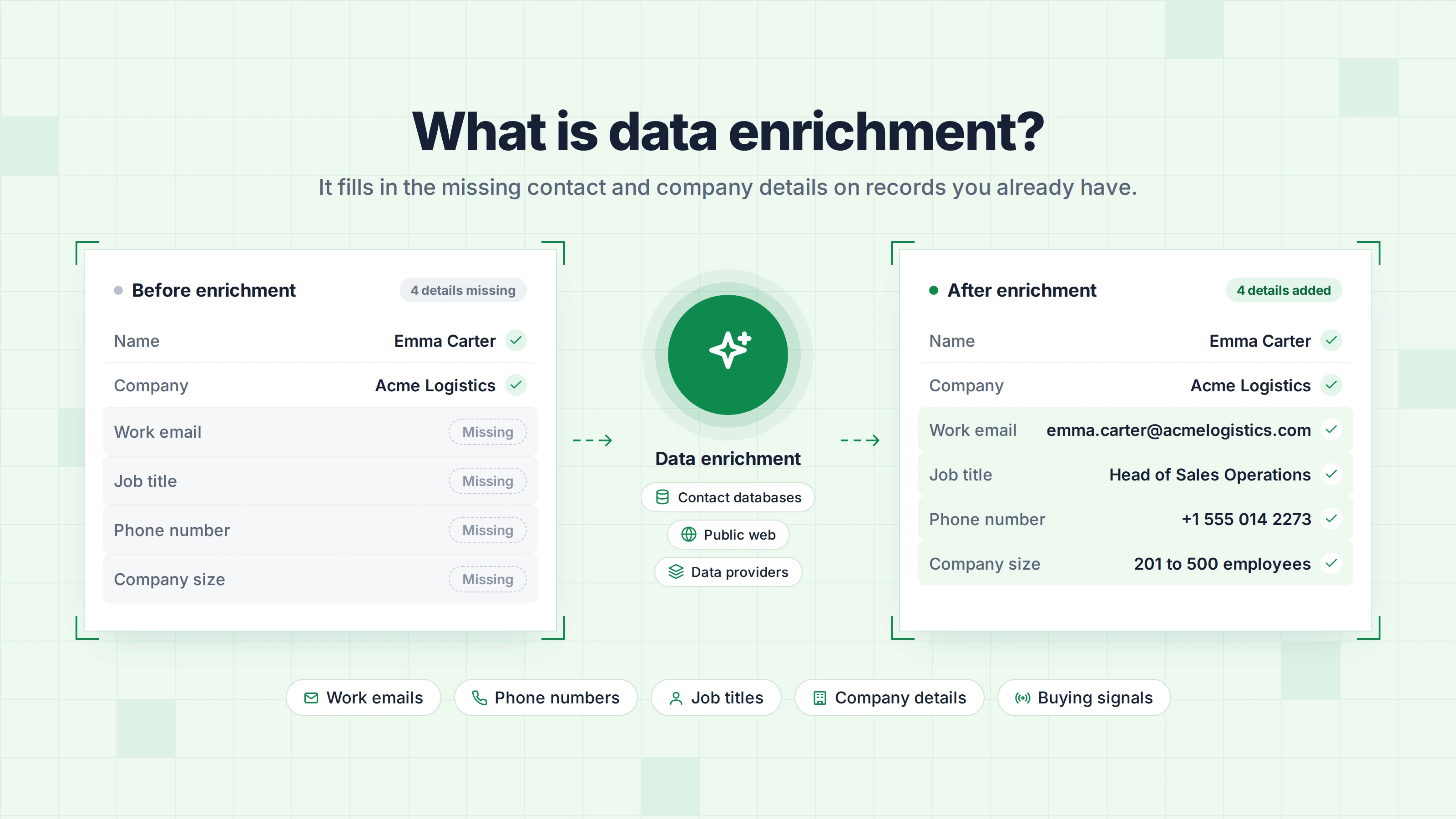
Data enrichment is the process of adding missing contact and company information to your lead and customer records. For example, it can add a prospect's work email, job title, or company size.
In simple terms, data enrichment turns raw data into complete data your team can act on. It combines your internal data, such as CRM records, with external data from third-party data providers. It also improves data accuracy by updating details that have changed.
Every enrichment starts with a detail you already know. It might be a person's name and company, or a company website. The enrichment tool matches that detail against its data and fills in the rest.
The table below shows one record before and after enrichment. I made up the person and the company.
Enrichment can only add details that its sources already hold. If no source has a person's direct phone number, no tool can find it. When I compare enrichment tools, I look at their data sources before their features.
This guide covers business data for B2B sales. Other industries use enrichment too. For example, banks use financial data enrichment to turn raw transaction data into clear merchant names and spending categories.
Let's look at the five types of information you can collect about a lead. Each type answers a different question about that lead.
Contact data enrichment adds the verified contact data you need to reach a prospect: a work email address, phone number, and LinkedIn profile URL.
For example, if your list only shows Emma Carter at Acme Logistics, contact enrichment can add her verified work email and LinkedIn profile.
For cold email, the work email matters most. Verify it before you add it to a campaign. Phone numbers are harder to find because they follow no standard pattern and are rarely published online, so they cost more. Leadsforge charges 1 credit for an email address and 10 credits for a phone number.
Role enrichment adds a prospect's job title and seniority, plus their department and location. These details show if a person can make or influence a buying decision. In B2C, this type is closer to demographic data, such as age or marital status.
For example, if you sell sales software, you can target sales directors and VPs instead of everyone at the company.
When a prospect's job title changes, role enrichment updates it in your records. A recent promotion or a move to a new company can also give you a good reason to reach out.
Firmographic enrichment adds company data like industry, employee count, and location. Some providers also add revenue, funding stage, and founding year. Many also add industry classification codes, such as SIC or NAICS codes, so you can filter by industry more precisely.
For example, if your ideal customer profile (ICP) is US software companies with 50 to 200 employees, firmographic data shows which accounts match.
Private companies do not have to publish their revenue, so many revenue figures for them are estimates. Before you use a revenue figure to qualify an account, check if the provider marks it as reported or estimated.
Technographic enrichment shows which tools a company uses, such as its CRM and email platform. Providers find this by scanning company websites and reading job posts.
For example, if your product only works with HubSpot, technographic data helps you skip companies that use Salesforce.
Technographic results are not always complete. A website scan can miss internal tools, and a job post may mention software the company has not adopted yet.
Intent data enrichment shows which companies may be ready to buy. Intent data is a type of behavioral data, because it shows what people at a company do online. It comes from two sources:
For example, if someone from a company visits your pricing page three times in one week, that company may be close to a decision.
Third-party intent usually shows which company is interested but not which person. You still need contact enrichment to find the right person to contact.
Behavioral data enrichment adds these behavioral signals to your customer records. Enriched behavioral data helps marketing and sales teams decide when to reach out.
Buying signals like funding rounds and new hires also help you decide which accounts to contact first. Leadsforge lets you search for these signals, including funding rounds and job changes.
Almost every data enrichment process follows the same five steps:
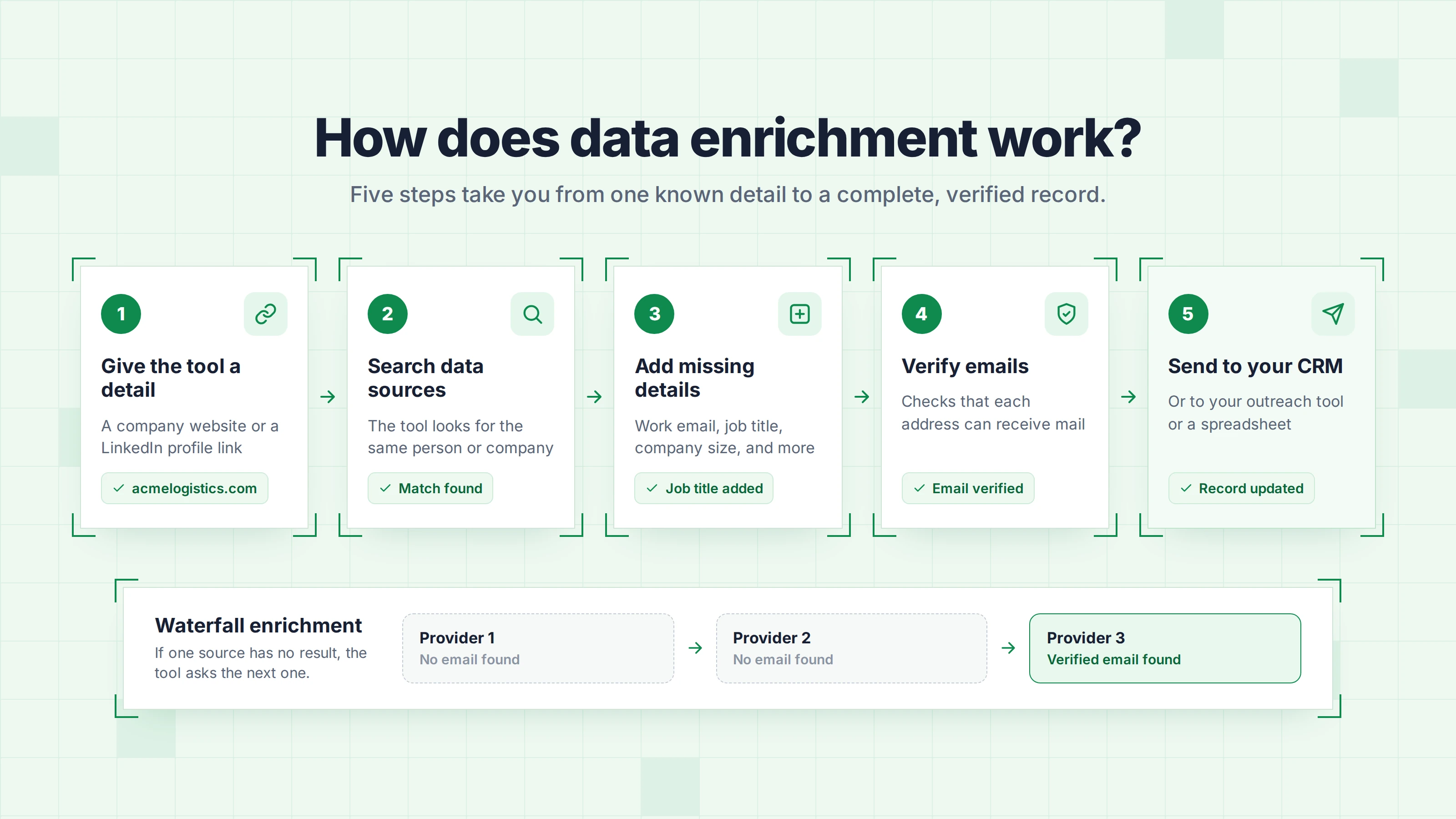
Enrichment tools get their data from internal or external sources. The quality of your enrichment data depends on these four main sources:
An enrichment tool can search for missing details in two ways. The table below compares them. Fill rate means the share of records that come back with the detail you asked for.
Leadsforge runs each lookup across 20+ data providers with waterfall enrichment.
Enrichment can run on one record at a time or on a whole list at once. Batch enrichment updates existing datasets, such as an old CRM export. The table below compares the two methods. An API is a connection that lets two pieces of software share data.
You can use the Leadsforge data enrichment API to look up one contact in real time or to enrich a full list.
You can build both methods into your data enrichment workflows. Automated enrichment replaces manual data entry and sends enriched data straight into your existing systems, such as your CRM or data warehouse.
The types and steps above make more sense when you see them in everyday sales work. The four examples below cover both lead data and customer data enrichment. I made up the numbers in them.
For example, a visitor may fill in your demo form with only a work email. Before enrichment, the email address is the only thing you know about this lead.
After enrichment, the record shows the person's job title and company. It also shows how big the company is and which country it is in. Your CRM can then send the lead to the right sales rep, and nobody has to look up the details manually.
Enrichment also lets you keep your forms short. A short form is easier to fill in, and you still get the details you need.
For example, you may have a spreadsheet with 500 names and company websites. Before enrichment, you cannot email anyone on that list.
After enrichment, each person has a verified work email and a job title. You can then remove anyone outside your target roles and add the rest to an email sequence.
For example, your CRM may hold 8,000 contacts that your team added over the last three years. Some of those people may have changed jobs since then.
When you enrich the records again, you can see who moved to a new company and who left. You can update their details or remove them before your reps call numbers that no longer work.
For example, you may have 300 companies that match your ICP, but your team only has time for 50 of them this month.
Intent data shows which of these companies are researching your type of product or hiring for related roles. You can then pick the 50 companies with the strongest signals and contact them first.
AI in data enrichment means using artificial intelligence to find, fix, and add missing information in your records.
It works on machine learning, natural language processing (NLP), and large language models. Instead of researching each record manually, you let AI spot the gaps and fill them in at scale.
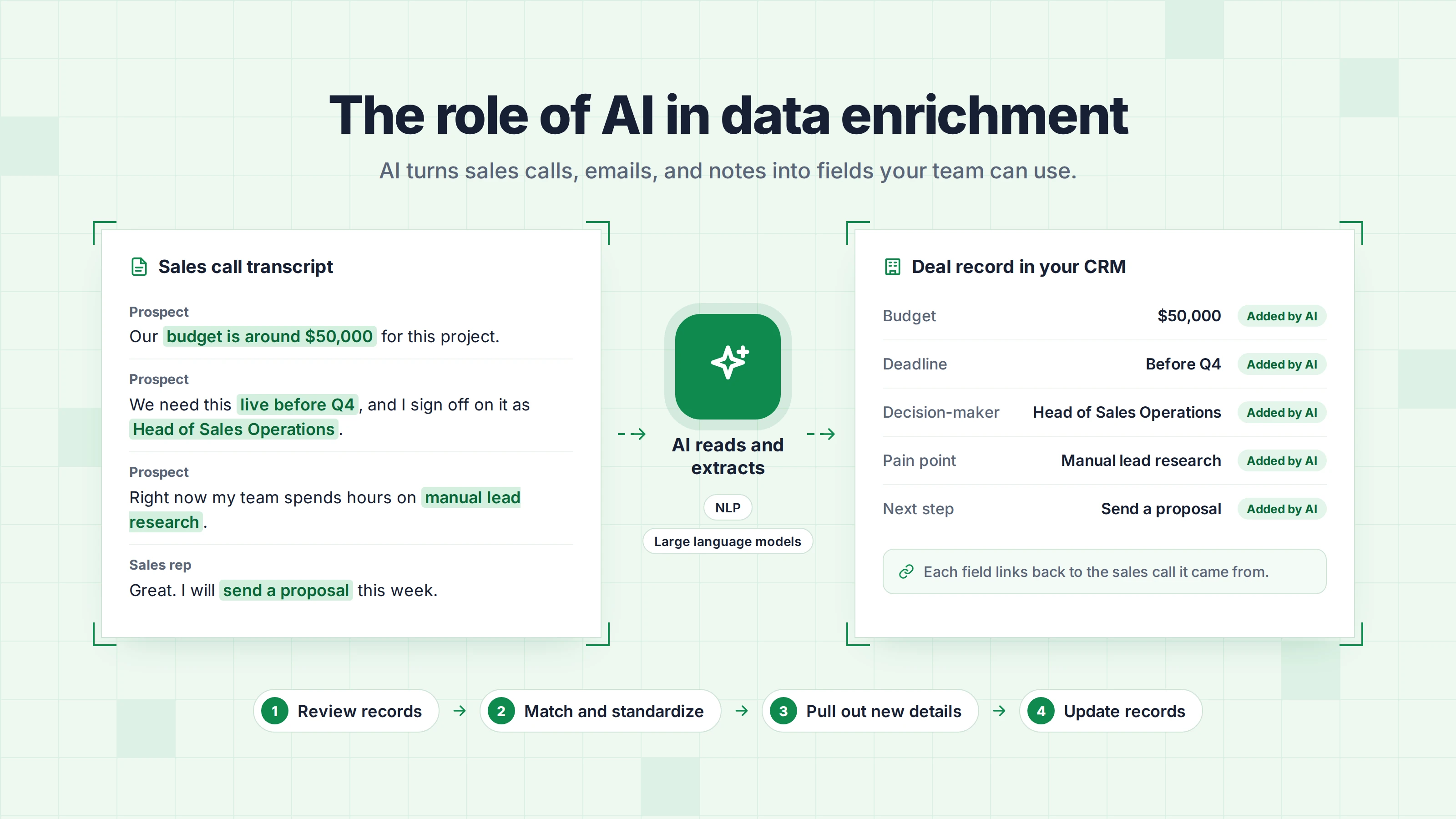
AI can also turn text that a database cannot store well into valuable data. That includes sales calls and emails, plus meeting notes and customer reviews. This adds missing context to your records, such as why a prospect wants to buy.
AI makes data enrichment processes faster. It usually follows four steps:
The table below shows what AI can add to different types of records.
For example, AI can read a sales call transcript and notice that the prospect mentioned a $50,000 budget and a Q4 deadline. It can then add both details to the deal record in your CRM.
Older lead tools make you build every list with filters. You pick an industry, a company size, and a job title. Then you scroll through the results to see if they match the people you want to reach.
AI tools let you describe the leads you want in a normal sentence instead. For example, you can type "Heads of sales at US software companies with 50 to 200 employees." The tool turns that sentence into a search and returns matching contacts with their details already filled in.
This approach helps most when you are testing a new market and do not know the right filters yet. Many lead tools now offer both options, so you can still set exact filters when you need them.
Tip: AI can get details wrong, so use a data provider that verifies the underlying data before adding it to your records.
All four are part of good data management and help improve data quality, but each one does a different job. Knowing the difference helps you pick the right tool for the problem you have.
Data cleansing, also called data cleaning, fixes or removes data that is wrong. It merges duplicate records, corrects typos, and puts fields like phone numbers into one format. Data enrichment adds data that is missing.
Cleansing makes your data correct, and enrichment makes it complete. For example, a cleansing tool can merge two records for the same person. It cannot tell you that this person moved to a new company last month. You need enrichment to find their new job title and email address.
Clean your data before you enrich it, so the enrichment tool works on correct records.
Data enhancement improves the data you already have. It can correct spelling, standardize job titles, or fill in a ZIP code from an address you already hold. Data enrichment adds new information from outside sources.
For example, enhancement fixes a misspelled company name in your CRM. Enrichment adds how many people work at that company. Some vendors use the two terms as if they mean the same thing, so check what a tool does before you buy it.
Email validation checks if an email address exists and can receive mail. It does not add any new details to a record. Data enrichment is what finds the email address in the first place.
You need both for cold email. Enrichment finds a prospect's work email, and validation tells you if it is safe to send to. Sending to invalid addresses causes bounces, and bounces hurt your sender reputation.
Many enrichment tools, including Leadsforge, return verified email addresses. In that case, validation is already part of the enrichment process.
Why is data enrichment important? Missing data and poor data quality slow down every sales and marketing task. Enriched customer data helps a sales team in seven main ways:
Different teams use data enrichment for different jobs.
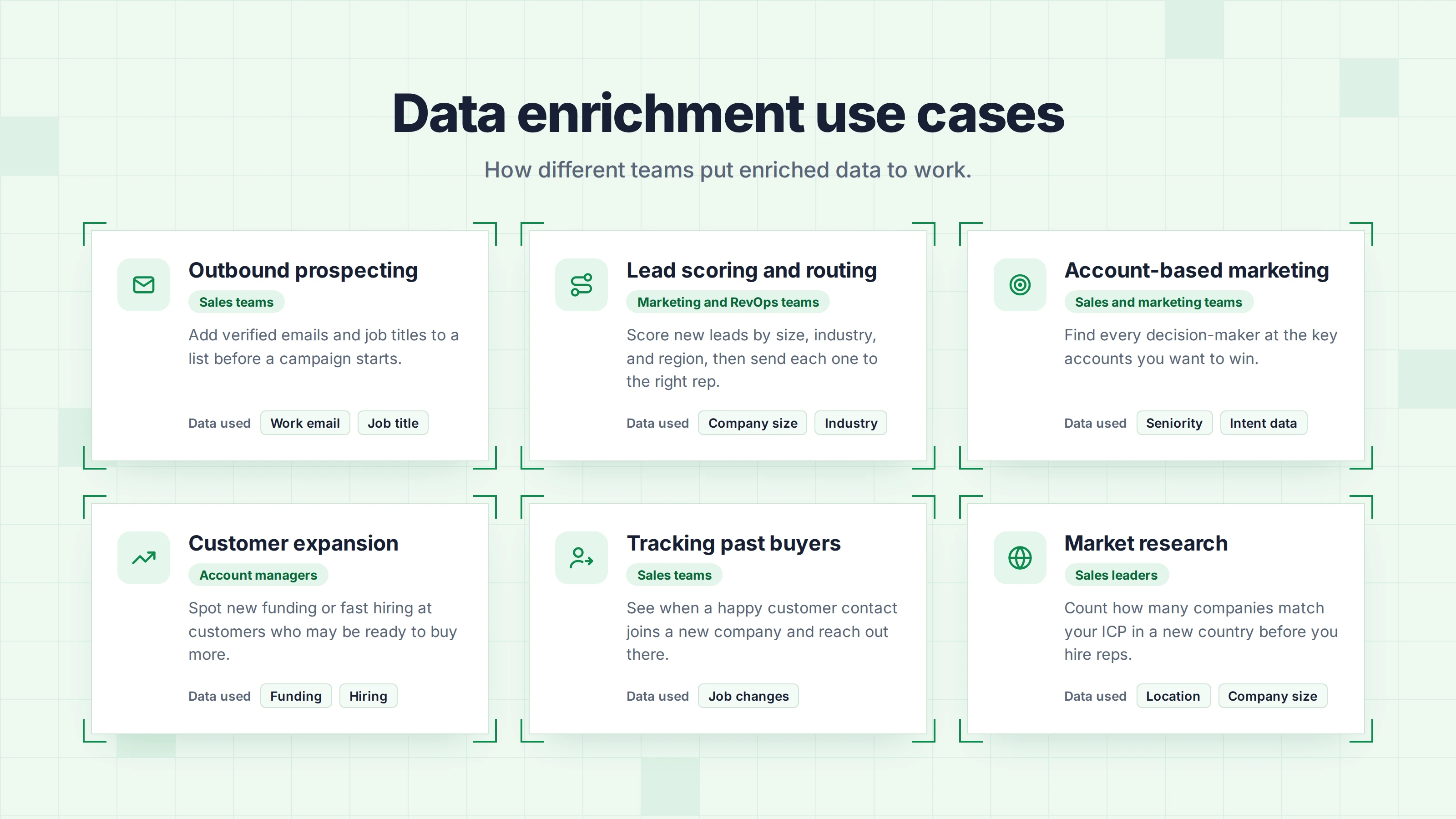
These are six common use cases:
Data enrichment fixes many data problems, but not all of them. Plan for these six challenges before you start:
Data enrichment can be legal under GDPR, but you have to follow certain rules. This section is not legal advice, so check your own obligations with a lawyer.
Under the EU's GDPR, B2B prospecting usually relies on legitimate interest as its legal basis. To use it, you have to pass a three-part test. You need a valid business reason, the data must be necessary for that reason, and your interest must not override the person's rights. Write down the result in a legitimate interests assessment (LIA) before you start.
Article 14 of the GDPR applies when you collect personal data from a source other than the person, such as an enrichment tool. You have to tell the person who you are, where you got their data, and why you use it. You also have to tell them that they can object.
If you use the data to contact the person, you must give them this information by your first message at the latest. In other cases, the deadline is one month after you receive the data. If a person objects to direct marketing, you must stop using their data for it.
GDPR covers how you handle personal data. Separate email marketing laws decide if you can send a cold email at all. Some EU countries like Germany require consent before you send marketing emails, even to business addresses.
Before I use a vendor, I ask where its data comes from and if it signs a data processing agreement. Leadsforge publishes its data processing agreement on its website. The UK and California have their own privacy laws, so check the rules in the places where your prospects live.
Follow these practices to keep your data accurate, reduce wasted credits, and maintain clean contact lists.
Choosing a data enrichment tool starts with knowing what information you need and how you plan to use it. Here are eight things to check before making a decision.
The table below compares six data enrichment companies and their tools. You can use it to build a shortlist before you test each tool on your own contacts.
Leadsforge is the lead generation and enrichment tool in the Forge stack. You use it to describe your ideal customer in plain words and get back a list of enriched, verified contacts.
It covers several of the points above, including waterfall enrichment and a direct connection to an outreach tool.
Leadsforge works best for SDR teams and founders who build new lead lists for outbound campaigns. On G2, it has a rating of 4.5 out of 5 from 12 reviews as of October 2026.
Leadsforge is a good fit when you need new, enriched contacts for outbound campaigns. If you only need to verify the emails on a list you already have, an email verification tool is enough.
Once you enrich a list, the next job is to send it without hurting your sender reputation. In the Forge stack, Leadsforge sends the list straight into Salesforge, so you do not export or upload a CSV file.
Salesforge validates every contact before it sends an email. Its Bounce Shield feature also blocks emails to addresses that look risky. Warmforge warms up every connected mailbox for free on any Salesforge plan, with unlimited warmup slots.
You can run this workflow in three ways:
Data enrichment is worth it for any team that contacts people from lists it did not build itself. The type you start with depends on your situation:
For outbound lists, I use Leadsforge because it handles finding and enriching leads in one place. I can describe my ICP in a sentence, enrich contacts across 20+ data providers, and filter companies by buying signals. I get a verified list that is ready for outreach without moving data between tools.
You can test Leadsforge on your own ICP with the 100 free credits you get when you sign up for Leadsforge.
Yes, data enrichment and data appending describe the same process. Appending is the older term. It comes from adding (appending) new fields to an existing record.
Lead generation finds new people to contact, while data enrichment adds details to people you already know about. A lead generation tool gives you names and companies. An enrichment tool fills in the emails, job titles, and company facts for those names. Some tools do both, so you can build and enrich a list in one step.
Yes, you can enrich data manually, but it only works for small lists. For each lead, you check their LinkedIn profile and company website and copy the details into your spreadsheet. That approach is fine for 20 target accounts. For hundreds of leads, a tool is much faster and can check that each email address works.
Start with the details you need for your next step. For cold email, that means a verified work email and the job title. For inbound lead routing, start with company size and country. You can add technographic and intent data later, once the basic details are in place.
Data enrichment tools usually charge per credit, per record, or through a subscription that includes a set number of credits. For example, the Leadsforge Essential plan costs $49 per month with monthly billing and includes 2,000 credits. The final cost depends on how many records you enrich and which details you ask for.
The best data enrichment tool depends on the job you need it to do. For outbound lists that go straight into email sequences, I use Leadsforge because it combines lead search and waterfall enrichment. For cleaning an existing CRM, a data cleansing tool is a better option.