
A question that comes up often from founders, SDR teams, and agency owners:
“We've rewritten our emails three times. Why are we still not getting replies?”
When I review cold email campaigns, I often find that the problem starts with the quality of the contact list rather than the messaging.
Think about how many emails people receive every day. According to the Radicati Group, 392.5 billion emails will be sent and received daily in 2026. When an email has nothing to do with the recipient's work, they are more likely to ignore it or mark it as spam.
Google recommends keeping spam complaint rates below 0.1% and never letting them reach 0.3%. Sending emails to people who have no reason to hear from you can push that rate up.
So, before rewriting another email, start with the list.
In this guide, I'll walk you through how to find companies that match your ideal customer profile (ICP), identify the right decision-makers, verify their email addresses, and prepare your list for outreach.
A cold email list is a collection of business contacts you haven't contacted before. These contacts match your target audience and may benefit from your product or service.
For example, if you sell sales engagement software, your list might include sales managers and SDR leaders at B2B SaaS companies. They are relevant prospects because their roles involve managing outbound campaigns and improving sales performance.
The goal is to reach qualified prospects who have a reason to consider your product. A large list of random email addresses won't help you get better results.
Here’s the process I follow, from defining who to reach to keeping the list clean after launch. Each step builds on the one before it, so work through them in order.
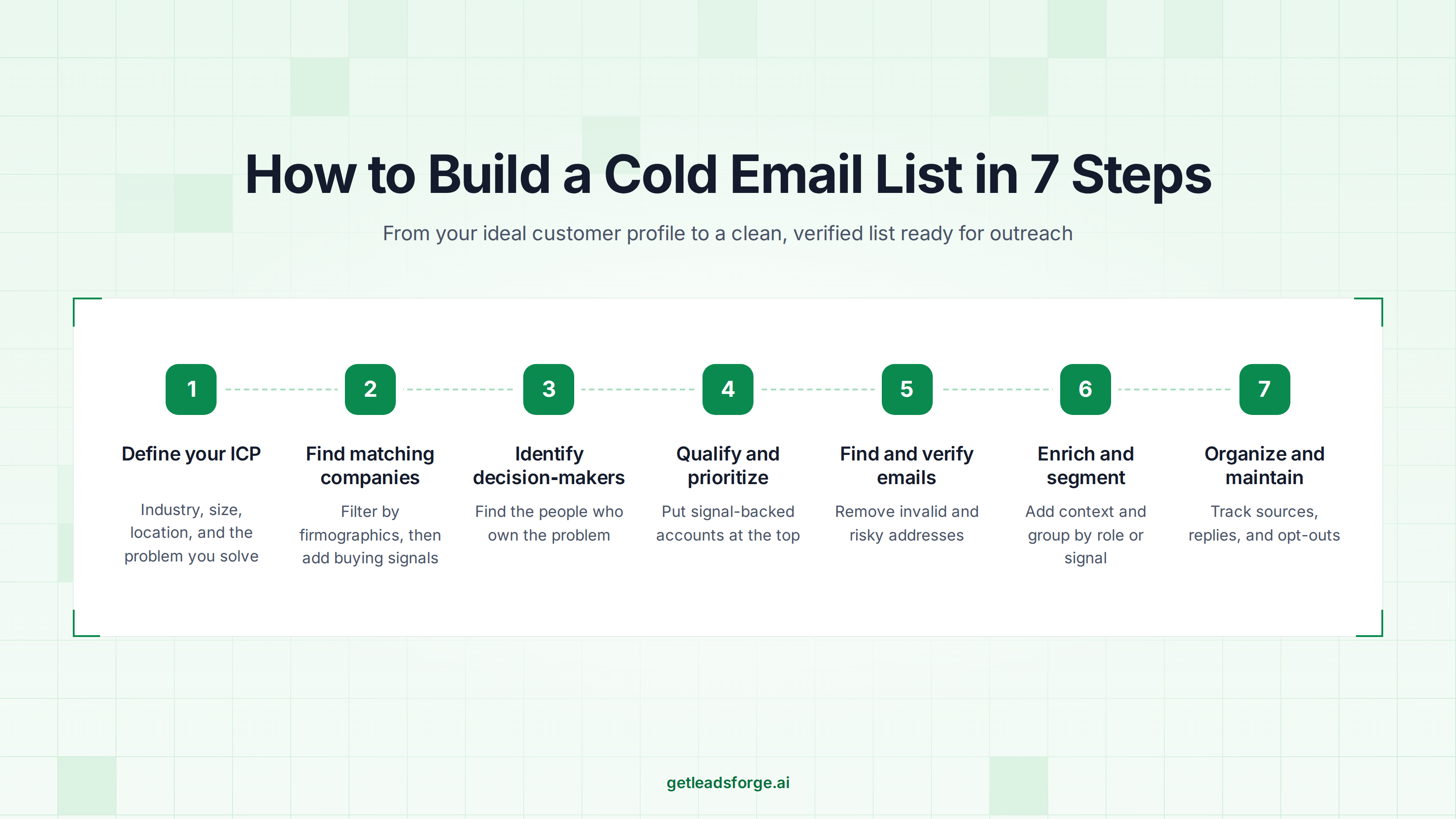
Before searching for contacts, decide which companies are most likely to benefit from your product or service. Your ideal customer profile (ICP) gives you a clear direction for prospecting.
Start by reviewing your existing customers. Look for common traits among the companies that get the most value from your product. If you're starting from scratch, study your competitors and the types of businesses they serve.
Consider these factors when defining your ICP:
For example, if you sell cold email software, your ICP might be B2B SaaS companies with 50 to 500 employees in the US and UK.
Write down your criteria before searching for prospects. A clear ICP helps you filter out companies that don't fit and focus your time on better opportunities.
If you already have customers, you can start with them. Leadsforge’s Company Lookalikes feature finds companies similar to the accounts you already close, based on firmographic and behavioral signals.

Keep your written ICP handy too. In Leadsforge, that same description becomes your search prompt in the next step.
Once you've defined your ICP, start building a list of companies that meet your criteria. You can find them through LinkedIn, company directories, industry websites, and B2B lead databases.
If you're building a list of 20 to 50 high-value accounts, manual research can work. For larger lists, use a B2B database to filter companies by industry, location, employee count, and other firmographic details.
You can also use buying signals to find companies that may need your product. Look for:
For example, if you sell recruiting software, look for technology companies with active job openings. They may have a stronger need for your product than companies that aren't hiring.
Leadsforge lets you search for companies and contacts using your ICP. Its Customer Profile search accepts plain-English prompts.
For example, enter: "B2B SaaS companies with 50 to 500 employees in the US."
Leadsforge searches its database of 500M+ B2B contacts and returns matching results. You can refine your search or apply additional filters.
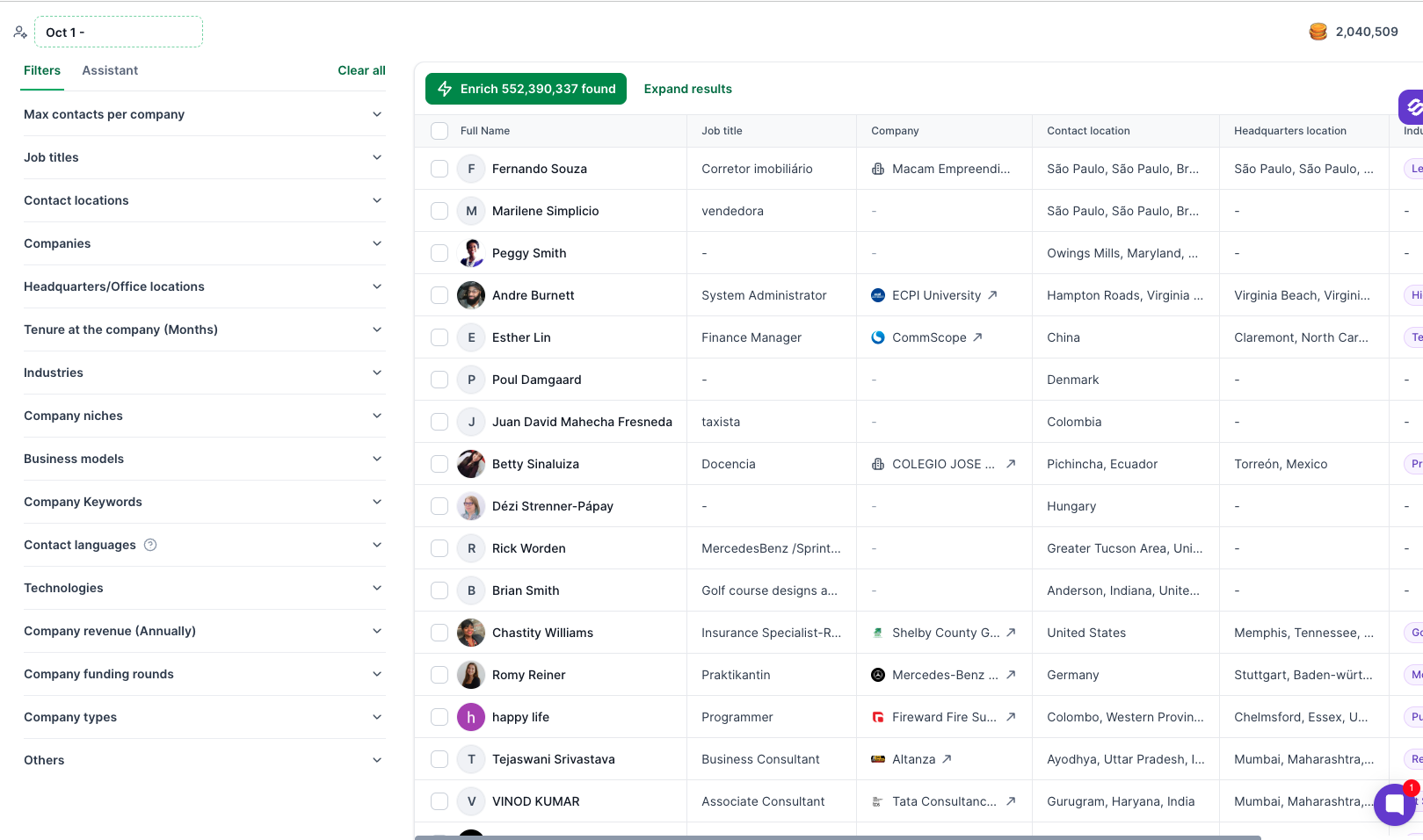
You can also use five other search options:
Read this guide to AI lead generation to learn more about plain-English prospect searches.
Before moving to the next step, review your results and remove companies that don't match your ICP. Keep the businesses that have a potential need for your product.
Finding the right companies is only half the work. You also need to identify the people who make or influence purchasing decisions.
The best contact depends on your product. A marketing platform may appeal to a head of marketing, while a cybersecurity solution may require input from an IT director.
Start with the job titles and departments that match your offer. Then consider seniority, responsibilities, and decision-making authority.
For example, if you're selling a lead generation platform, your target contacts might include:
Use LinkedIn, company websites, and contact databases to find people who match these roles.
If you research prospects on LinkedIn, the Leadsforge LinkedIn email & phone finder Chrome Extension can save you a step. It finds verified emails from LinkedIn profiles and searches, using the Leadsforge 500M+ contact database. New users get 100 free credits on signup. After that, each lookup uses Leadsforge credits.
Leadsforge can help you find contacts based on your search criteria. Use relevant contact filters, such as job title, seniority, and location where available, to narrow the results.
Review the contacts before adding them to your list. A relevant job title is a useful starting point, but it doesn't guarantee that the person owns the problem your product solves.
You can also identify more than one relevant contact at a target company. Keep their roles separate so you can tailor your messaging to their responsibilities.
Not every contact who matches your filters deserves the same level of attention. Before finding email addresses, check whether each prospect is worth pursuing.
Start by reviewing the company, the contact's role, and any available information about their business needs. Look for a clear connection between your product and the problems they may face.
Use these questions to qualify prospects:
You can also assign simple priority levels to your contacts.
Start with high-priority prospects, then review the remaining contacts as you learn which segments respond to your outreach.
Intent signals make the High priority row easier to fill. Leadsforge surfaces accounts that are actively researching your category, so you can spot companies that may have a current need. Your team should still review each contact before deciding who to email first.
Once you've identified suitable prospects, find their business email addresses. You can use B2B databases, email-finding tools, company websites, and contact enrichment services.
A prospect's name and job title aren't enough to launch a campaign. You should verify the email address before sending your first message.
Email verification helps identify addresses that may be invalid or risky. Sending emails to too many invalid addresses can increase bounces and harm your sender reputation.
Pay attention to these common verification results:
Remove invalid addresses and review catch-all or unknown results before sending. Verification does not guarantee inbox placement, so you should also maintain proper email authentication and responsible sending practices.
Leadsforge uses waterfall enrichment to find contact details.
For every contact, it queries multiple data providers in sequence to fill in emails, phone numbers, and other fields.
Review the returned details and check the verification result for each address before you add it to a campaign.
A name and email address tell you how to contact someone. Additional information helps you decide what to say.
Data enrichment adds useful details to your contact records. These include job titles, company information, and industry. Use these details to qualify prospects and personalize your emails.
If some records are missing fields, you can enrich them in Leadsforge before you segment the list.
Once you've collected the information, divide your list into smaller segments.
You can segment contacts by:
For example, a sales engagement platform might create separate segments for SDR managers at SaaS companies and sales leaders at recruitment agencies. Both groups may need the product, but their priorities can differ.
Use those differences to adjust your opening line, value proposition, and call to action.
Keep your segments specific enough to support relevant messaging. If two groups need different messages, place them in separate segments.
Before launching your campaign, organize your contacts in a CRM, spreadsheet, or lead management platform.
A consistent format makes it easier to personalize emails, track replies, and avoid contacting the same person twice.
If you send with Salesforge, you can skip the export step. Leadsforge lists move straight into Salesforge sequences without a CSV file.
Your cold email list should include these fields where available:
You don't need every field for every campaign. Start with the information you need to qualify prospects and write a relevant message.
Remove duplicate records and keep your contact fields consistent. Record replies and opt-outs so you can stop outreach when required.
Your list also needs regular maintenance. People change jobs, companies update their domains, and email addresses become inactive. Review your data before each campaign, remove hard bounces, update outdated details, and respect opt-out requests.
Track campaign results as well. If one segment generates relevant replies while another gets little engagement, review your targeting and messaging before expanding the list.
Even with the right tools, a few mistakes can reduce list quality and waste your outreach efforts.
Before launching your campaign, check that you’ve completed these steps in order:
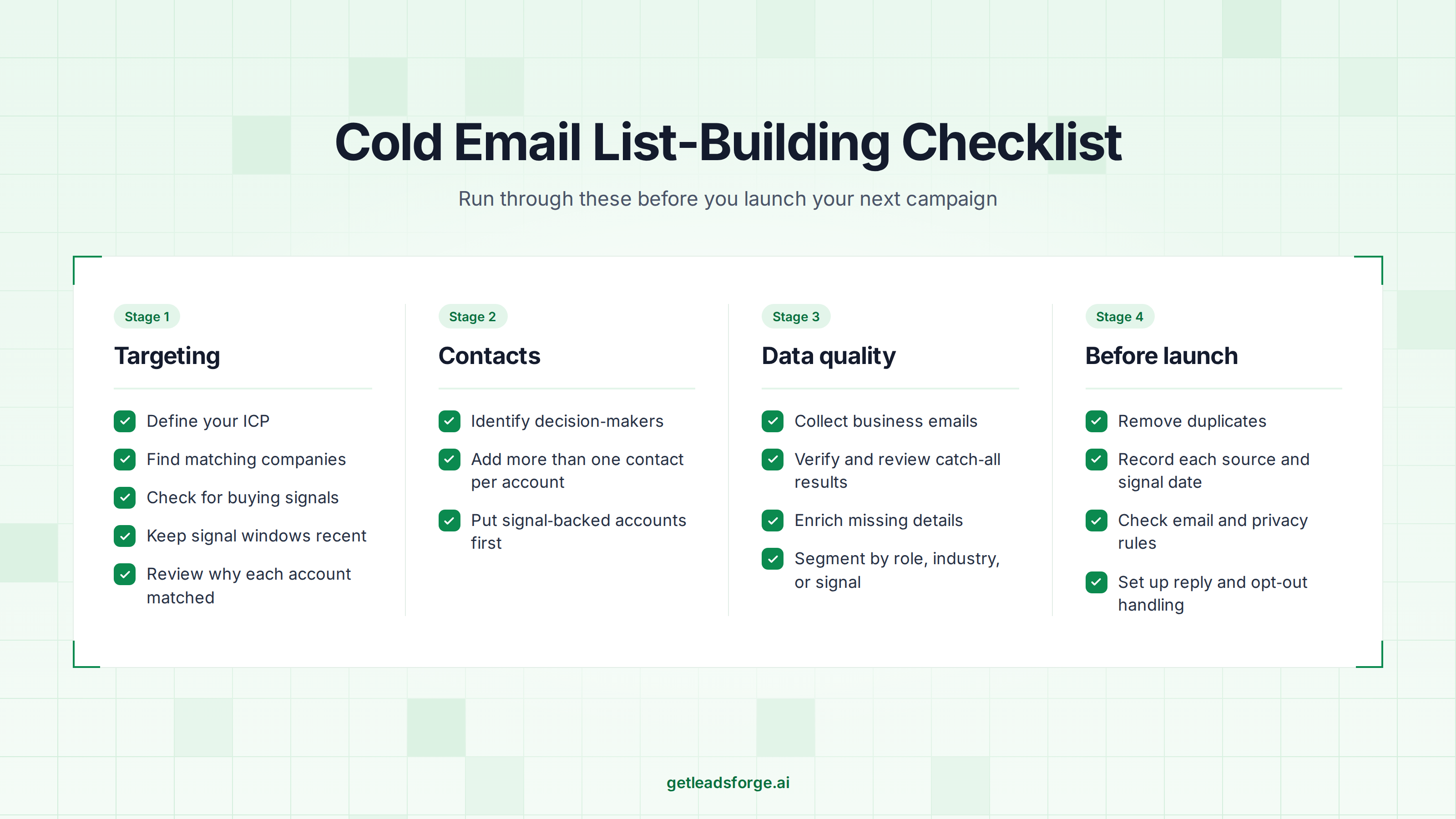
A cold email list that gets replies starts with knowing who you want to reach. Define your ICP first. Then find companies that fit it and the people who own the problem.
Qualify prospects before you look up their emails. Verify every address, segment the list, and clean it before each campaign.
If you want to cut down on manual research, Leadsforge lets you describe your ICP in plain English and get a matching list from a 500M+ contact database. You can add intent signals, Company Lookalikes, and waterfall enrichment as your list grows.
New users get 100 free credits on signup. You can sign up for Leadsforge and build your first list today.
Start by defining your ideal customer profile and identifying the people who make purchasing decisions. Find companies through B2B databases, LinkedIn, or company websites. Qualify the prospects, collect their business email addresses, verify the data, and organize the contacts into relevant segments.
The best method depends on your audience and campaign. B2B databases help you find contacts by role, industry, company size, and location. LinkedIn and company websites support manual research, while buying signals can help identify prospects with a relevant business need.
Yes, for a small list. You can research prospects through LinkedIn, company websites, and public business directories. New Leadsforge users also get 100 free credits on signup to test lookups on a small list. Building a large, verified list usually takes more time or paid credits.
A free database works for testing a small list, but a paid one usually makes more sense once you need volume. Free options often limit your searches, filters, and verified emails. Paid databases usually add enrichment and buying signals, so you spend less time checking data by hand. Leadsforge gives new users 100 free credits, so you can test the data on a small list before you pay.
Use the details in your list to give each prospect a clear reason for your email. Start with the basics: first name, role, and company. Then add one specific detail, like a recent funding round or a job change. The buying signal and date you recorded make a natural opening line. Keep every detail accurate, because a wrong name or outdated company undoes the effort.
Email verification helps identify invalid and potentially risky addresses before they enter your campaign. Removing bad addresses can reduce avoidable bounces and help protect your sender reputation. Verification doesn't guarantee inbox placement, so you should also maintain proper email authentication and responsible sending practices.
Review your list before every campaign. Remove hard bounces and duplicates, update outdated contact details, and respect opt-outs. The frequency of deeper reviews depends on how old the data is, how often your audience changes, and how frequently you use the list.
Cold email rules depend on the recipient's location, the type of contact, and how the data was collected. Requirements may cover the lawful use of personal data, sender identification, unsubscribe options, and recordkeeping. Review the laws that apply to your target markets and seek legal advice when needed.