
When you visit a competitor's LinkedIn page, you can see how many people follow them.
But what if you want to know their names?
Knowing who's following a competitor can help you understand their audience and find potential customers for your business.
LinkedIn, however, doesn't let you see the full follower list of a competitor's page.
So, how can you find these people?
In this guide, I'll cover four ways to find LinkedIn followers, how each method works, and what it offers.
Before looking at the different methods, it's worth understanding what LinkedIn lets you see. It depends on whose followers you're trying to find.
First, followers and connections aren't exactly the same. When someone accepts your connection request, they automatically become your follower.
However, they can unfollow your updates without removing the connection. Other people can follow your profile without connecting with you.
The information you can access also depends on whether you're looking at your personal profile, a company page you manage, or a competitor's page.
Here's what LinkedIn lets you see and download:
As you can see, LinkedIn gives you access to your own followers, but you can't view the people following a competitor's company page. You can see how many followers they have, but LinkedIn doesn't show their names.
If you're researching a competitor or looking for potential customers, that information can be useful. You'll need to look beyond LinkedIn's built-in features to find those people.
Here's a quick look at the four methods side by side:
Each method gives you a different piece of the picture, so you'll often use more than one together. The first two help you find and contact prospects, while the last two are LinkedIn's own views of who follows you.
LinkedIn doesn't give you your followers' email addresses, and it doesn't show who follows pages you don't manage. That's where third-party B2B data providers help, because they match people to business emails and phone numbers using their own contact and company data.
But most providers only enrich people you already know about. They can't tell you who follows a specific company page, so check for follower data before you pay.
Even with follower data, no provider can promise a complete list of a competitor's followers, because LinkedIn doesn't publish one. Still, some get you much closer than others, which is why I start with Leadsforge.
Its Company Followers Search shows any company's followers, including a competitor's, from a database of 500M+ B2B contacts. Once you have the competitor's follower list, you can add verified emails and send it straight to a Salesforge sequence.
Here's how Leadsforge compares with other popular providers:
If you already have names and companies, any of these providers can help you add emails. Most of them offer free credits or a free plan, so you can check data quality on a small list before you pay.
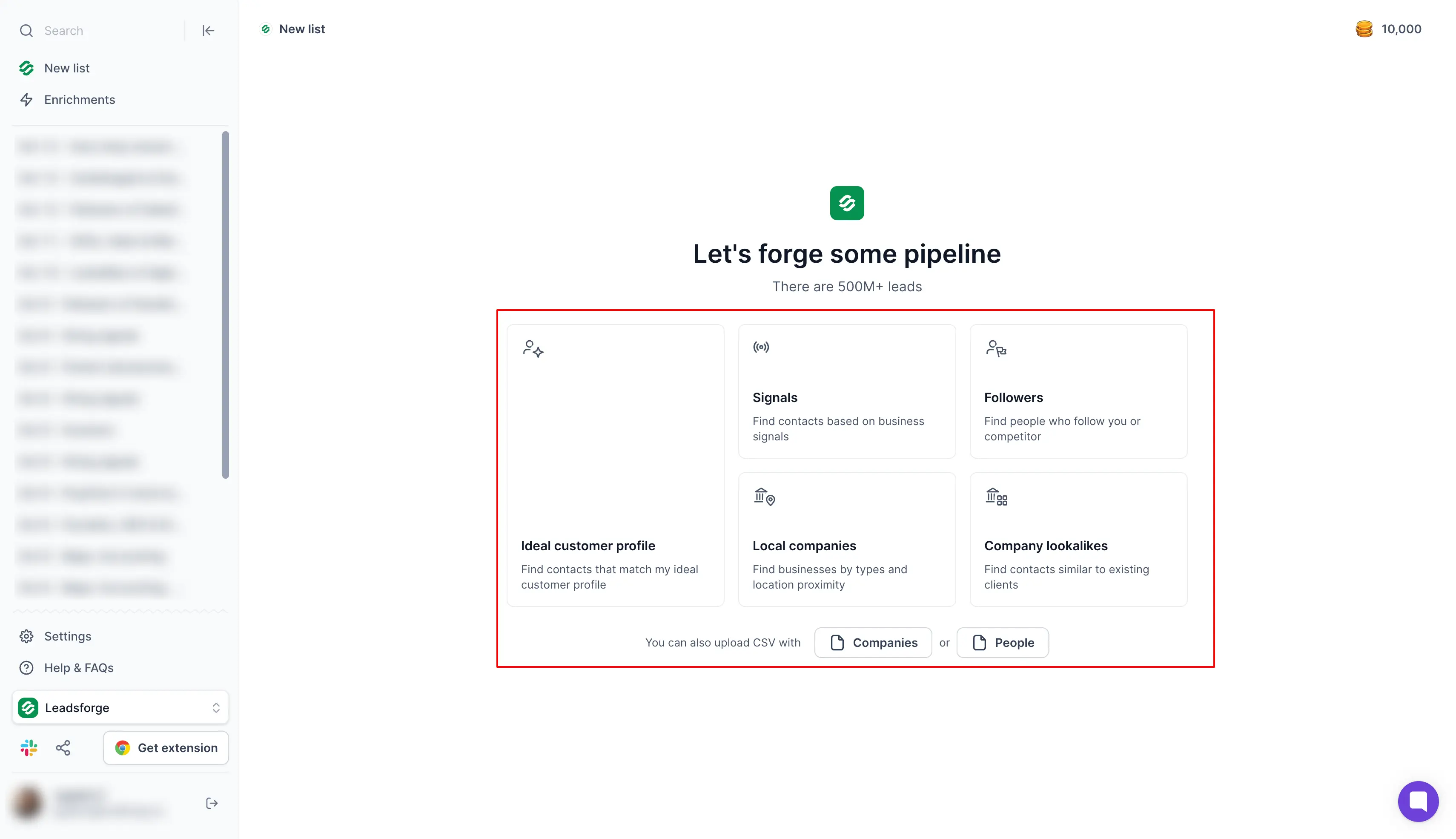
Here's how to extract followers with a Company Followers Search, from signing up to sending your list:
Before you spend any credits, each result shows the person's name, job title, company and LinkedIn profile. That way, you can decide who's worth enriching first.
When you click Enrich, Leadsforge uses waterfall enrichment, which means it checks multiple data providers one after another until it finds the details. You're only charged when it finds something:
For example, emails for 500 filtered followers cost at most 500 credits. That fits inside one month of the Essential plan, which gives you 2,000 credits for $49 with monthly billing.
Overall, a B2B data provider is the right place to start when you need contact details, especially one with follower data like Leadsforge. You can start with 100 free Leadsforge credits here.
Sales Navigator is LinkedIn's prospecting tool for sales teams, and it comes with a paid subscription. If your team already pays for it, it's one of the easiest ways to find buyers who already know your brand.
Here's what it lets you do:
The "Following your company" filter is the most useful part for this job. On its own, it only shows your followers, but when you combine it with your buyer filters, you can find something like VPs of Sales at UK companies with 50 to 200 employees who already follow you.
That makes them warm leads, because they've seen your brand before your first message. As a result, your first touch feels much less cold.
If you only have a few leads, you can look up each profile with the LinkedIn email & phone finder Chrome Extension, which also works inside Sales Navigator.
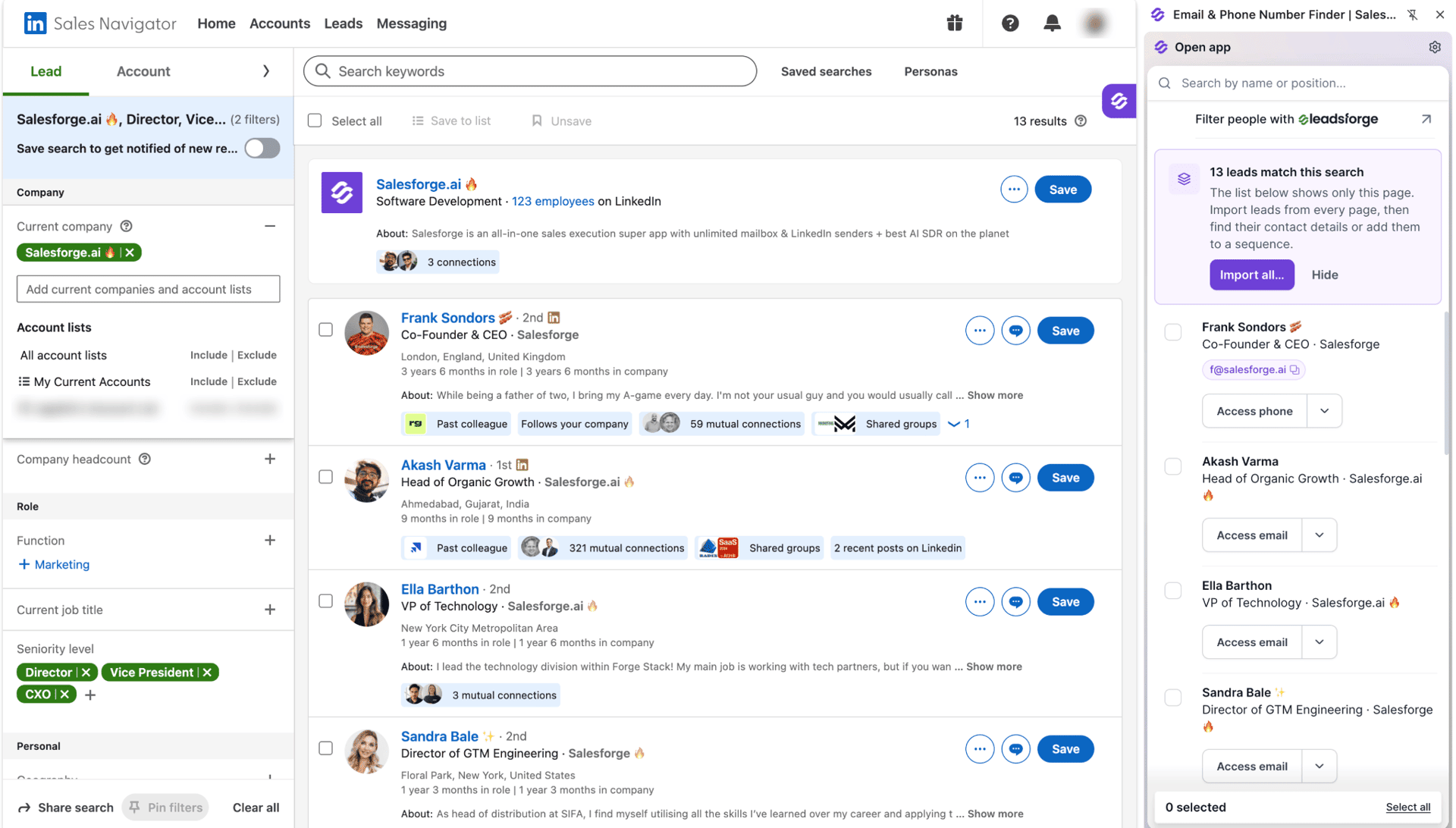
That means you can find leads straight from your Sales Navigator search results and get their verified emails, with each lookup using Leadsforge credits.
Overall, Sales Navigator makes sense when you already pay for it and want warm leads from your own audience. If you need a competitor's audience or emails at volume, you'll need to pair it with a data provider.
If you manage your company's LinkedIn page, this is the first place I'd look. It's a free tool, and all you need is admin access.
Page analytics is an official LinkedIn feature that gives admins an All followers section. That makes it one of the most legitimate ways to see who follows your company page.
Once you open it, you'll find:
Yes. Viewing your own page's followers through the admin view is an official LinkedIn feature, and it helps you gain insights into your audience and spot potential leads.
I also check the demographics before I build any follower list. If most of your followers are entry-level, a follower list will spend credits on people who can't buy, so it's worth knowing that before you start.
If you post on LinkedIn, the people who follow you personally are another warm audience. They've chosen to see your posts, so they already have some idea of who you are and what you talk about.
LinkedIn shows them to you in a few clicks:
Each follower appears with their name, headline and profile links, so you can open anyone who looks relevant. As you go through the list, look for the people who fit your ideal customer profile and check their publicly available business details before you reach out.
Pay extra attention to followers who also comment on your posts, because they're often your most engaged prospects.
Using third-party tools to scrape LinkedIn breaks LinkedIn's terms, so it's worth knowing how much account risk you're taking on. Whether it also breaks the law depends on how you collect the data and where your prospects live.
Here's what to keep in mind:
The best-known case is hiQ Labs v. LinkedIn, where a US appeals court first doubted that scraping public data broke the Computer Fraud and Abuse Act (CFAA). But in November 2022, a district court ruled that hiQ had breached LinkedIn's User Agreement through its scraping and fake accounts, and hiQ later agreed to a $500,000 judgment.
That's why all four methods in this guide use LinkedIn's own features or data providers with their own databases. Keep in mind that this isn't legal advice, so check your obligations in each market you sell to.
Once you have a list, the next step is getting replies. That mostly comes down to how relevant your first message feels to the person reading it.
Here's the order I follow:
That last step is where Salesforge helps with your outreach campaigns. It runs cold email and LinkedIn steps in one sequence, so if a LinkedIn connection request isn't accepted, the sequence can switch to email instead.
Replies from both channels land in Primebox™, Salesforge's shared inbox, and lists from Leadsforge go straight into your sequences without a CSV export. The Pro plan costs $40 per month with annual billing and comes with a 14-day free trial that needs no credit card.
If you'd rather not run the outreach yourself, you can hire Agent Frank, the AI SDR inside Salesforge, who handles prospecting, follow-ups and meeting booking for you. His plans start at $499 per month, billed quarterly.
The right method depends on two things: whose followers you want and what you already pay for. Here's a quick way to decide:
Whichever method you choose, verify every email before you send, because even a good list can contain an old address that bounces.
If you're building your first list, this guide on building a cold email list explains the next steps.
Once you know which accounts reply best, Company Lookalikes can find similar companies in Leadsforge for your next campaign.
If you're just starting, begin with what LinkedIn already gives you. Page analytics and your Followers tab cost nothing, and they show you who's paying attention to you right now.
From there, Sales Navigator and B2B data providers help you find the right prospects and get their contact details. However, none of these methods can give you a complete list of a competitor's followers, because LinkedIn doesn't publish one.
For competitor audiences, Leadsforge's Company Followers Search is the closest option I've found, and it adds verified emails in the same place. Whichever route you take, filter your list first, verify every email and send from warmed mailboxes.
When you're ready, you can start with 100 free Leadsforge credits and run your first Company Followers Search today.
Only for company pages you manage, through the All followers list in Page analytics. For any other public company page, LinkedIn only shows how many LinkedIn followers it has, so you'll need a data provider like Leadsforge to see who they are.
Using automated tools to scrape LinkedIn breaks its User Agreement and can get your account restricted, and privacy laws like GDPR still apply to the data you collect. This isn't legal advice, so check the rules in each market you sell to.
Not directly, because LinkedIn doesn't let you export followers by name, only your own connections through its data archive. To get names with emails, you can build the list in Leadsforge and export it as a CSV for Excel or Google Sheets.
Yes, LinkedIn's Page analytics and your profile's Followers tab are both free. For competitor followers with emails, Leadsforge gives you 100 free credits to start.
It ranges from free to about $185 a month at entry level, depending on the method. For example, Leadsforge starts at $49 per month with monthly billing, while Sales Navigator Core costs $119.99 per month with monthly billing.
The best option is one that gets you the list without risking your own account. For a competitor's followers, I use Leadsforge's Company Followers Search, because it searches its own database and adds verified emails.
Yes, for that, you must verify your email list before sending emails, warm up every mailbox and send from a separate domain so bounces don't hurt your main one.