Most lead lists I get handed are about half usable. The names are there, the companies are there, and then I hit the email column, and it's a wall of blanks. Run that same list through one more data provider and some of the gaps fill in. Run it through three or four, in the right order, and most of them do.
That's waterfall enrichment. It isn't new, and it isn't magic, though a lot of people online talk about it like it's both. I've seen it double the size of a workable list, and I've also seen it quietly push a sending domain's bounce rate into the danger zone.
So this is the guide I wish I'd had the first time I set one up. I'll go through how it works step by step, what it really costs per contact you can email, the seven mistakes I see most, a 10-step setup you can copy, and exactly how I run it inside Leadsforge, with real screenshots from the app.
TL;DR
Waterfall enrichment asks one data provider for a contact's details. If it comes back empty or unsure, the record moves to the next provider, and it keeps going until a verified result turns up or the sources run out.
One provider usually finds 40% to 60% of a B2B list. A well-ordered waterfall of three or four providers tends to push that past 80%.
More providers don't automatically mean more good data. Validation, a clear catch-all rule and providers that don't share the same upstream source matter more than the number of providers.
Run emails and phone numbers as two separate waterfalls. They need different sources, different checks and very different budgets.
Log which provider returned every result, so you know which sources are earning their place and which are hurting your bounce rate.
In Leadsforge, each lookup runs across 20+ providers. Work emails and LinkedIn profiles cost 1 credit per verified result, mobile numbers cost 10, and nothing is charged when nothing is found.
What Is Waterfall Enrichment?
Here's the plain-English version, plus the handful of terms you'll keep running into.
Waterfall enrichment is a way of filling in missing contact data (work emails, mobile numbers, LinkedIn URLs, job titles) by asking several data providers one after another, in a fixed order. The first provider gets the first shot. If it finds nothing, or finds something it isn't sure about, the record drops down to the second provider, then the third, and so on. As soon as a verified result comes back, it stops.
Think of it like ringing three friends to get someone's number. You call the friend most likely to have it first. If they don't, you call the next one. You stop calling as soon as somebody gives you a number that actually works.
The name comes from how it looks on a whiteboard: records tumbling from one source to the next like water down a set of steps. It's one specific approach to data enrichment, which is the broader job of adding missing fields to records you already have.
What a waterfall is not
It's not parallel enrichment. Asking every provider at once and picking the best answer is a different setup with a much higher cost. I compare the two later on.
It's not a database. A waterfall is a routing layer that sits on top of databases. What comes out can only be as good as the sources you plug in.
It's not a data quality fix on its own. If the validation step is weak, a waterfall just collects more bad data, faster.
Key terms you'll see in this guide
Key data enrichment terms and their meanings
Term
What it means
Find rate (hit rate)
The share of contacts where a provider returned something.
Valid rate
The share of contacts where the result passed verification.
Verified / valid
The mailbox was confirmed to exist on the mail server.
Catch-all
The company's mail server accepts every address, so the mailbox can't be confirmed either way.
Risky/unknown
The check couldn't reach a clear answer.
Upstream source
Where a provider actually gets its data; two providers can share one.
Pay per result
You're only charged when verified data comes back.
Pay per attempt
You're charged for every lookup, found or not.
Why One Data Provider Is Never Enough
The short answer: every database has blind spots, and no two providers have the same ones.
Here's why the gaps happen in the first place:
Providers build their data differently. Some crawl the public web, some rely on contacts their users share, and some license data from partners.
Most are strong in one region and patchy elsewhere. A provider can be great on US SaaS companies and close to useless on German manufacturers or Indian agencies.
Company size matters. Enterprise contacts are well covered. Small businesses and fast-moving startups often aren't.
Data goes stale. People change jobs, companies rebrand, domains move. Figures collected by Bitscale put B2B contact data decay at 22.5% to 30% a year.
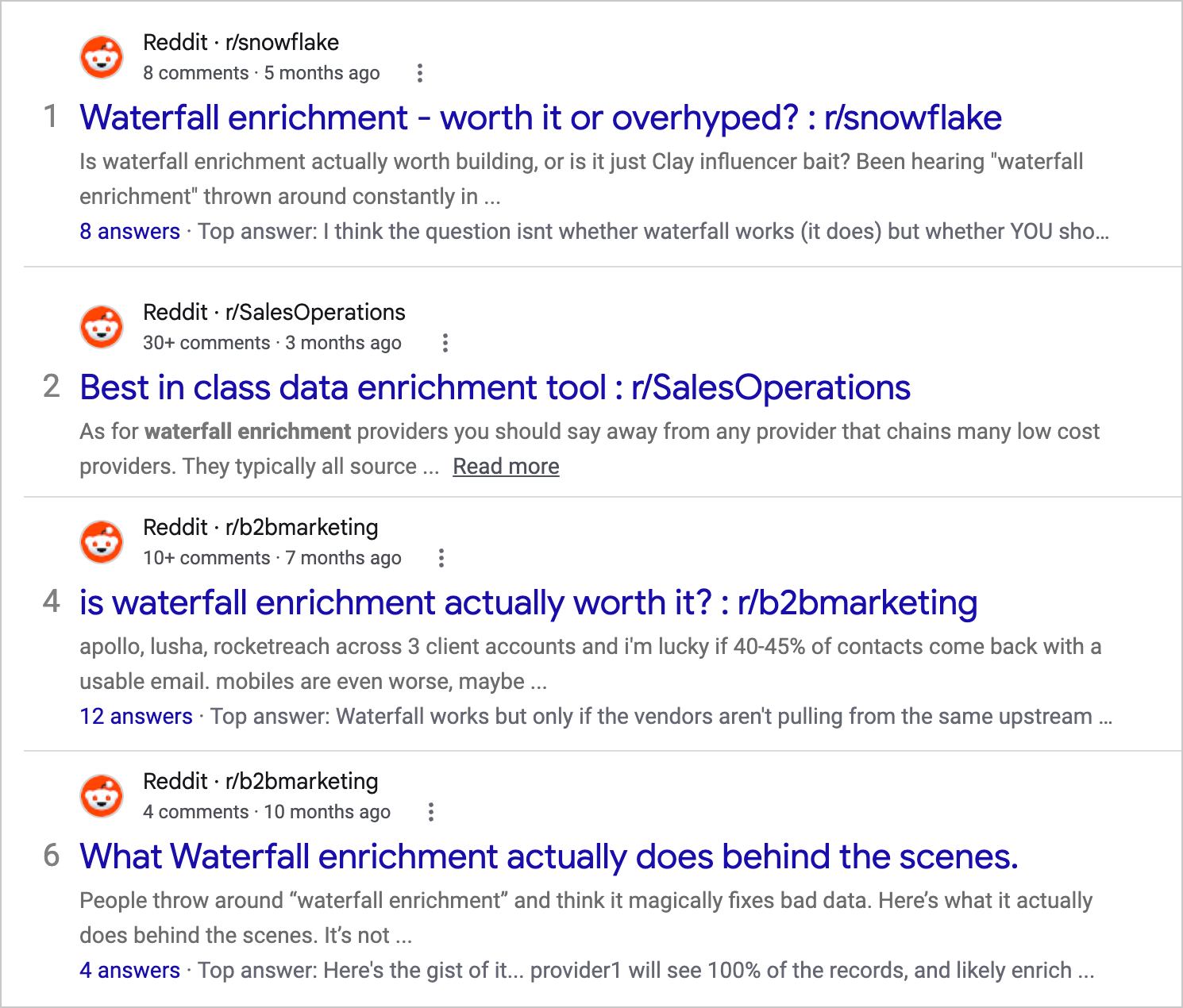
You can see this frustration all over Reddit. In an r/b2bmarketing thread asking whether waterfall enrichment is worth it, one person said that across three client accounts using three of the biggest single-source tools, they were lucky to get 40% to 45% of contacts back with a usable email, and mobile numbers were even worse. The top reply said waterfalls work, but only when the vendors aren't all pulling from the same upstream source. Keep that point in mind, because it comes up again in the mistakes section.
When providers are chained together, the numbers jump.
Unify says teams typically move from about 60% match rates on one provider to above 85% with three or four sources.
FullEnrich puts single-source tools at 50% to 60% and its own waterfall at around 80%. Those are vendor numbers, so I treat them as a direction rather than a promise, but they line up with what I see on real lists.
Why reach matters more than list size
Here's the way I think about it. If you have 1,000 contacts but only 450 emails, you don't have a 1,000-person list. You have a 450-person list. Fill that up to 800, and you've nearly doubled what your team can work on, without a single extra hour of research. That's the whole reason waterfall enrichment caught on.
How Waterfall Enrichment Works: The 5-Step Process
Every waterfall follows the same five moves, whether it's a no-code tool or a script someone on your RevOps team wrote.
Step 1: A record goes in with whatever you already know
Every lookup starts with identifiers. The more you give the waterfall, the fewer wrong-person matches you get back.
Minimum: first name, last name and company domain.
Better: add the LinkedIn profile URL. It's the closest thing B2B data has to a unique ID.
Best: add job title and location too, so providers can tell two people with the same name apart.
Step 2: The first provider gets a shot
The record goes to whichever source sits at the top of your order. That should be the one with the best accuracy for your target market, not just the cheapest or the best known.
Step 3: The result gets checked, not just returned
This is the step that separates a good waterfall from a dangerous one. A returned email is not the same as a correct email.
A proper check runs in this order:
Syntax check: is it a properly formatted email address?
Domain and MX check: does the domain exist, and is it set up to receive mail?
Mailbox check: does the mail server confirm that this specific mailbox exists?
Catch-all detection: is the server set to accept everything, which makes the mailbox check meaningless?
Anything that fails gets thrown out. Catch-all results should be flagged separately, not counted as verified.
Step 4: Misses and weak results fall to the next provider
If the first provider came back empty, invalid or unsure, the record moves down to the second provider, and the same checks run again. This keeps going down the list.
Step 5: It stops at the first verified hit
As soon as a result passes verification, the waterfall stops for that record. That's what keeps it cheaper than asking everyone at once: you only pay for extra lookups on the records that genuinely need them.
A worked example
Here's what that looks like on four contacts running through a three-provider email waterfall:
Example of how waterfall enrichment checks contacts across three providers
Contact
Provider 1
Provider 2
Provider 3
Outcome
Priya, US SaaS
Verified
Not asked
Not asked
Done after 1 lookup
Lukas, German manufacturer
No match
Catch-all
Verified
Done after 3 lookups
Tom, US healthcare
Risky
Verified
Not asked
Done after 2 lookups
Ana, Brazilian agency
No match
No match
No match
Left blank
Three out of four found, and nobody paid for Priya twice. Ana stays blank, and depending on your tool you either paid for three failed attempts or paid nothing. That billing detail matters a lot, which is why it gets its own section below.
Waterfall vs Single-Source vs Parallel Enrichment
There are three ways to pull contact data, and picking the wrong one is where most enrichment budgets go sideways.
Comparison of single-source, waterfall, and parallel data enrichment approaches
Approach
How it works
Typical coverage
How cost behaves
Best for
Single-source
One database, one lookup per contact
Around 40% to 60%
Cheapest per lookup
Small lists in one well-covered market
Waterfall
Providers asked one by one, stops at the first verified hit
Often 80% or more with 3 to 4 providers
Extra lookups only on records that need them
Most outbound teams, especially across regions
Parallel
Every provider asked at once, best answer picked
Similar to waterfall
Highest, every provider is paid on every record
High-value accounts where you want two sources to agree
How I pick between them:
Single-source if you sell into one narrow market and your current provider already finds 85% or more of your ICP.
Waterfall for almost everyone else. It's the best balance of coverage and cost.
Parallel only for a short list of high-value accounts, like a 50-account ABM program where you want two providers to agree before anyone hits send.
What Waterfall Enrichment Really Costs
Coverage gets the headlines, but cost per verified contact is the number that decides whether a waterfall is worth running.
Two questions decide almost everything here:
How many extra contacts does each new provider actually find on your lists?
Are you charged for every attempt, or only when verified data comes back?
Pay per attempt vs pay per result
Pay per attempt: every query costs you, whether it finds anything or not. On a messy international list, where half the records fall through three or four providers, this can double or triple your cost per usable email.
Pay per result: you're only charged when a verified result comes back. Misses are free, so adding a fallback provider costs you nothing unless it finds something.
How to work out your cost per verified email
Here's the math I run. Say I send 1,000 contacts through a four-provider waterfall on pay-per-attempt pricing. The figures are illustrative, but the shape matches what I see on real lists.
Provider lookup volume, verified emails found, and lookups per email found
Provider
Records it sees
Verified emails found
Lookups per email found
Provider 1
1,000
550
1.8
Provider 2
450
150
3.0
Provider 3
300
60
5.0
Provider 4
240
15
16.0
Total
1,990 lookups
775 emails
2.6 on average
To run it on your own data, follow these steps:
Write down how many records each provider sees. That's the leftovers from the provider above it.
Write down how many verified results each provider adds.
Divide records seen by results found. That's your lookups per email for that provider.
Multiply by your cost per lookup to get the real cost per email for each provider.
Drop any provider whose cost per email is higher than a contact is worth to you.
Look at that fourth provider. It costs 240 lookups to find 15 emails, which is the point of diminishing returns. That's why I rarely run more than three or four sources for email. On pay-per-result pricing, though, that tail end only costs you the 15 emails it actually found, which changes the decision completely.
Phone numbers cost more, so budget them separately
Mobile numbers are harder to find and pricier to buy, usually many times the cost of an email. In Leadsforge, for example, a verified mobile number costs 10 credits while a verified work email costs 1.
So I follow two simple rules:
Only run phone enrichment on contacts I genuinely plan to call.
Run it after the first email touch, on people who opened, clicked or replied, or on my top-tier accounts.
Stop paying for lookups that come back empty
Leadsforge checks 20+ providers on every lookup and only spends credits when it finds verified data. Your first 100 credits are free.
This is the part most vendor guides skip, and it's exactly what practitioners keep arguing about on Reddit and LinkedIn.
One r/snowflake thread asked outright whether waterfall enrichment is worth building or just "Clay influencer bait." The top answer said the real question isn't whether it works (it does) but whether you should be the one building it. That's a fair way to frame it. Here are the seven ways I see waterfalls go wrong, and how to fix each one.
Mistake 1: Stacking providers that share the same upstream data
What goes wrong: some providers resell or license the same underlying data. Chain them and you pay twice for the same blind spots. A popular r/SalesOperations thread warned people to stay away from any waterfall that chains lots of low-cost providers, because they often all draw from the same source.
How to fix it: test each provider on its own against the same sample. If provider B barely finds anything provider A missed, drop it.
Mistake 2: Thinking more providers means more valid emails
What goes wrong: each extra provider drags in a few lower-quality results. One practitioner ran four provider setups against the same 350 prospects and shared the results on DEV. The single-provider setup had the lowest bounce rate, and bounces climbed as he added layers.
How to fix it: accept only results marked valid. That one change took his bounce rate from the 12% to 14% range down to under 3%.
Mistake 3: Weak validation at the end of the chain
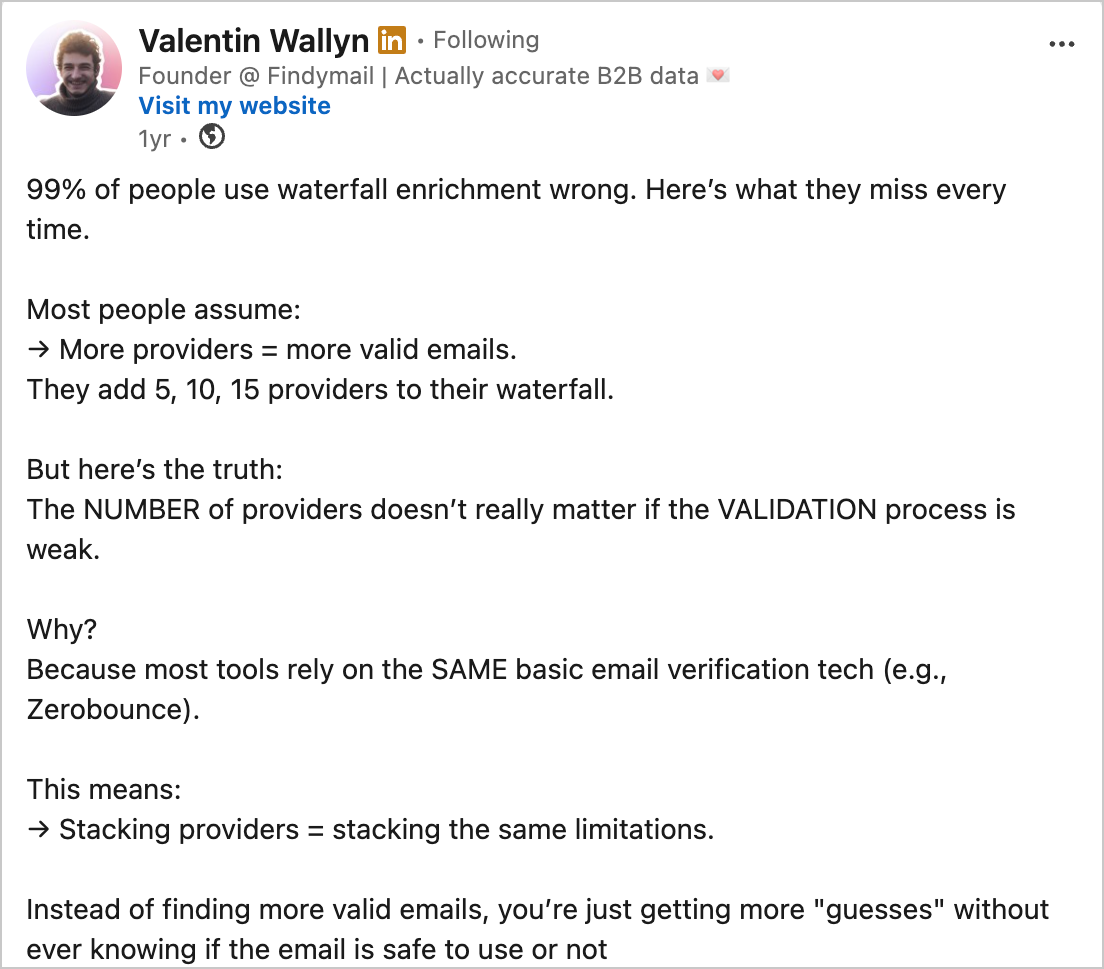
Valentin Wallyn, founder of the email finder Findymail, made this point bluntly in a LinkedIn post. He obviously has a horse in this race, but the argument holds up: if every provider in your chain leans on the same basic verification, stacking them just stacks the same limits.
What goes wrong: plausible-looking emails get through and bounce later.
How to fix it: judge tools on how they validate, especially catch-all handling, not just on how many providers they list.
Mistake 4: Counting catch-all emails as wins
What goes wrong: a lot of tools report catch-all addresses as found. On a dashboard that looks like great coverage. In your sending account it looks like bounces.
How to fix it: split every result into valid, catch-all, risky and invalid. Decide what you'll do with each before anything gets near a sequence (Step 7 of the workflow below covers this).
Mistake 5: Not logging which provider returned what
What goes wrong:Hunter calls this the measurement trap. A bounce doesn't tell you which provider produced the address. And as a top answer on an r/b2bmarketing thread put it, the first provider sees 100% of your records while every provider after it only sees the leftovers. So their hit rates depend on where they sit in the order, and swapping two providers changes their numbers completely.
How to fix it: store the source provider, verification status and date next to every result. After two or three campaigns, you'll know which sources earn their place.
Mistake 6: Enriching a list that was never a fit
What goes wrong: a waterfall fills contact gaps. It doesn't fix targeting. If half your list is outside your ICP, enriching it just means paying to email the wrong people faster.
How to fix it: filter first, enrich second. Remove bad-fit companies, duplicate records and personal email addresses before anything goes into the waterfall.
Mistake 7: Ignoring where the data comes from
What goes wrong: a waterfall is only as compliant as its weakest source. If one provider collected data in a sketchy way, that becomes your problem too.
How to fix it: ask every vendor where their data comes from, how they handle opt-outs and whether they'll sign a data processing agreement. This matters even more for prospects in Europe under GDPR.
How to Build a Waterfall Enrichment Workflow in 10 Steps
This is the setup I'd use if I were starting from scratch today, whether you build it yourself or configure a tool.
Step 1: Decide what you actually need
Enriching every possible field is tempting and expensive.
Start by writing down:
The goal: cold email, cold calling, CRM cleanup or lead routing.
The must-have fields: for cold email, that's usually a verified work email and a LinkedIn URL.
The nice-to-have fields: mobile numbers, job titles, headcount, industry.
Step 2: Clean and filter the list first
Remove companies and people outside your ICP.
Remove duplicates, matching on email, LinkedIn URL or name plus domain.
Normalise company domains (strip "www.", "https://" and anything after the slash).
Remove personal addresses like Gmail or Yahoo unless you really want them.
Skip records you've already enriched in the last 60 to 90 days.
Make sure every record has at least a full name and a company domain. Add LinkedIn URLs wherever you can. Records with only a name and company name (no domain) are the ones most likely to come back with the wrong person.
Step 4: Benchmark providers on a sample
Don't pick your order based on marketing pages.
Test it:
Pull around 200 contacts that look like your real target market.
Run the sample through each provider on its own, not in a waterfall yet.
Verify every result with the same validation tool, so the comparison is fair.
Record four numbers for each provider: find rate, valid rate, catch-all share and cost per valid email.
Check overlap: how many of provider B's valid emails did provider A already find?
Step 5: Set the order
For emails: put the most accurate provider first, even if it isn't the cheapest. Bounces cost more than credits.
For cheap firmographic fields: cheapest first is fine.
For multiple regions: set a different first provider per region if your benchmark shows a big gap.
For length: start with three providers. Only add a fourth if it clearly finds new valid contacts.
Step 6: Set your acceptance rules
Decide in advance what each verification status means for the record:
Email verification statuses, meanings, and recommended actions during waterfall enrichment
Status
What it means
What I do with it
Valid
Mailbox confirmed
Accept and stop the waterfall
Catch-all
Server accepts everything
Keep looking in the next provider, then follow my catch-all rule
Risky / unknown
Check couldn't decide
Keep looking in the next provider
Invalid
Mailbox doesn't exist
Discard and keep looking
Not found
No provider had it
Leave blank, maybe try LinkedIn instead
Step 7: Decide your catch-all policy
Pick one of these three before you send anything:
Drop them. The safest choice if your domain is new or your bounce rate is already creeping up.
Send from a secondary domain at low volume. Watch bounces closely and pull the plug if they rise.
Send normally. Only if catch-alls are a small share of the list and your sender reputation has room to spare.
Whatever you pick, never let catch-alls into a cold campaign on your main company domain.
Step 8: Run phone numbers as a separate waterfall
Phone data comes from different specialists, gets checked differently (line type, carrier, mobile vs switchboard) and costs far more.
Keeping it separate means:
You only spend phone credits on contacts worth calling.
You can order phone providers by phone accuracy, not email accuracy.
Both waterfalls are easier to measure and tune.
Step 9: Log the source of every result
Add these columns to your sheet or CRM:
Source provider
Verification status
Date enriched
Field enriched (email, phone, LinkedIn)
Step 10: Re-verify before sending and track the right numbers
An email that was valid three months ago might not be valid today. Re-verify any list that's been sitting around before it goes into a sequence.
Then track these numbers after every run:
Key email enrichment metrics, calculation methods, and performance benchmarks
Metric
How to calculate it
What good looks like
Find rate
Contacts with any result / total contacts
Above 80% for email on a clean list
Valid rate
Contacts with a valid email / total contacts
As close to find rate as possible
Bounce rate
Bounced emails / emails sent
Under 2%, ideally under 1%
Cost per valid email
Total spent / valid emails
Lower than what a contact is worth to you
Provider contribution
Valid emails added by each provider
Every provider adds a meaningful amount
Quick pre-flight checklist before you hit enrich:
List filtered to your ICP and de-duplicated
Name plus domain on every record, LinkedIn URL where possible
Only the fields you'll actually use selected
Email and phone handled as separate runs
Acceptance rules and catch-all policy decided
Source, status and date logged for every result
Build It Yourself or Use a Managed Tool?
This is the question behind most of the Reddit threads, so here's an honest comparison.
On r/gtmengineering, someone asked for waterfall providers they could call purely through an API inside their own pipeline, with no interface at all. Over on r/SideProject, another person was trying to maximize coverage without overspending. Both are really asking the same thing: build or buy?
Comparison of building a waterfall enrichment system yourself and using a managed tool
Build it yourself
Use a managed tool
Setup time
Days to weeks
Minutes
Provider contracts
One per provider, each with its own API keys and billing
One account
Control over order and rules
Full
Limited to what the tool exposes
Maintenance
Yours, every time an API changes
The vendor's
Billing
Usually pay per attempt across several vendors
Often pay per verified result
Best for
Teams with a GTM engineer and very specific needs
Most sales teams and agencies
My take: unless you have someone who enjoys maintaining integrations, a managed waterfall wins. Many managed tools (Leadsforge included) also offer an API, MCP server and CLI, so you can still plug them into your own pipeline without managing a dozen vendor contracts.
How to Run Waterfall Enrichment in Leadsforge (Step by Step)
This is my actual workflow in the app, from building the list to sending it, with screenshots from my own account.
Step 1: Start a new list and pick a sourcing path
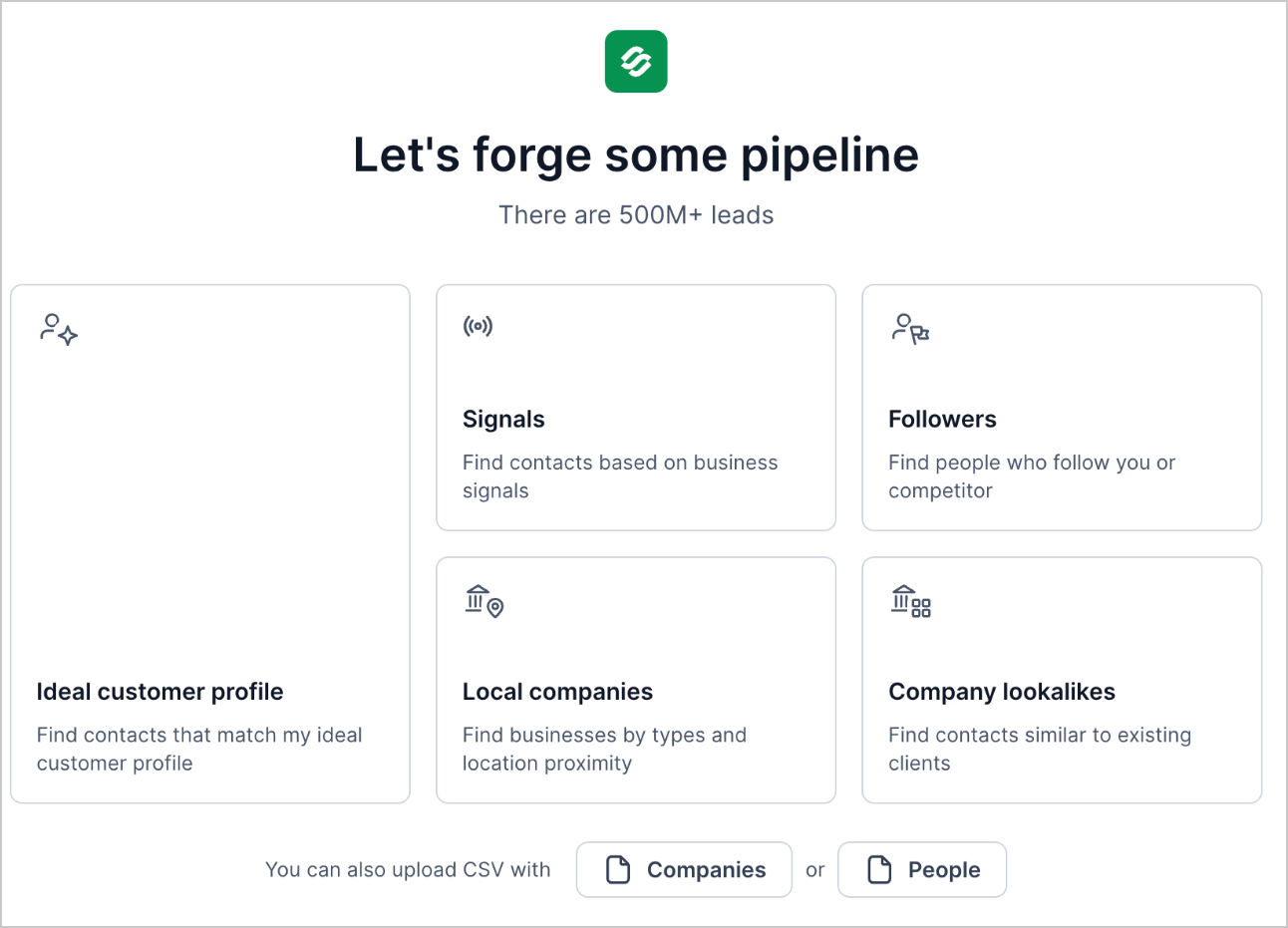
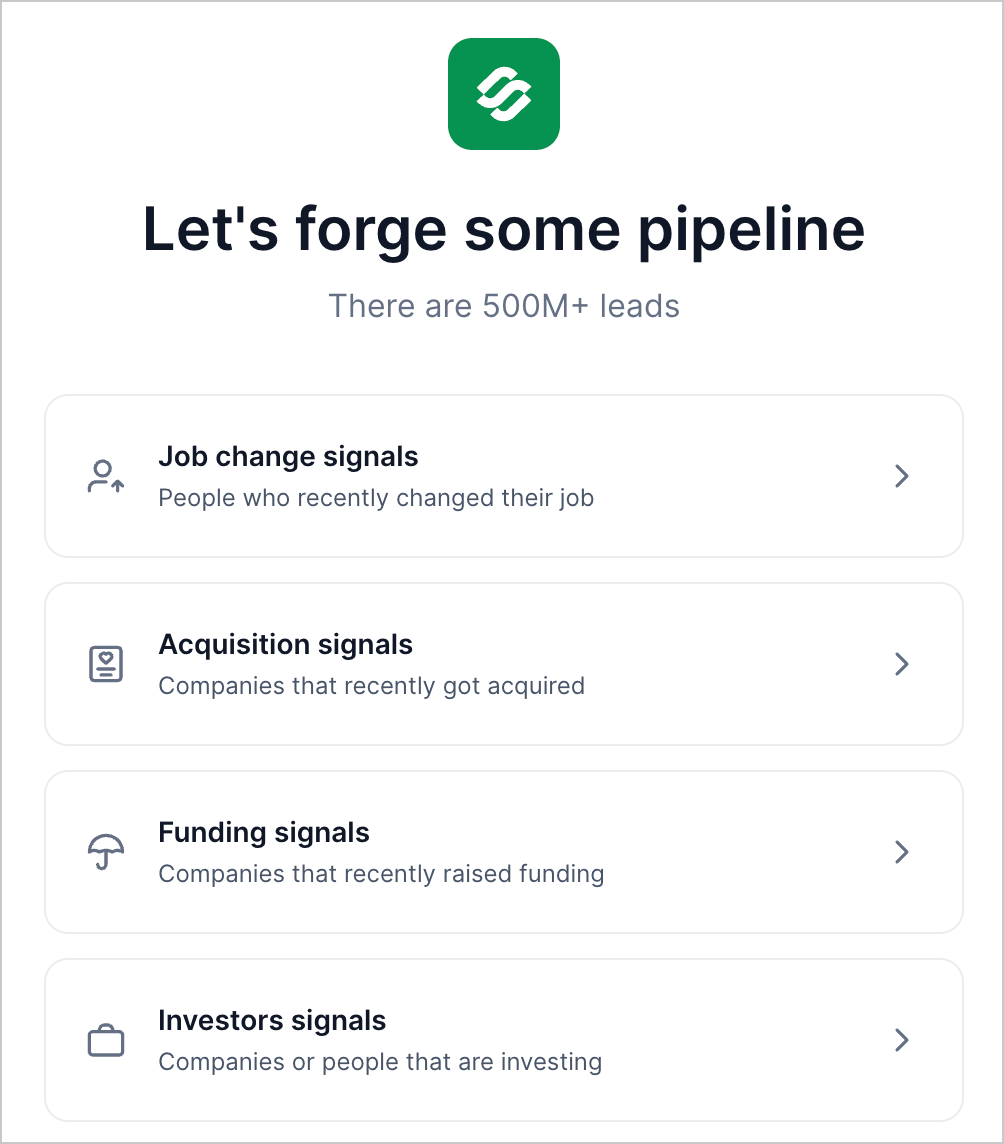
When I click New list, Leadsforge shows me every way to find leads in its 500M+ contact database:
Ideal customer profile: describe who you sell to in plain English and get a matching list. No filter stacking, no boolean strings.
Signals: find people and companies based on real events (more on this in Step 3).
Followers: pull the people following your company page or a competitor's.
Local companies: set a location and radius, pick a business type like dentists or law firms, and pull matching businesses using Google Maps data.
Company lookalikes: paste in customers you've already closed and find companies that look like them.
CSV upload: already have a list? Upload a CSV of companies or people and go straight to enrichment.
Step 2: Describe your ICP to the Assistant
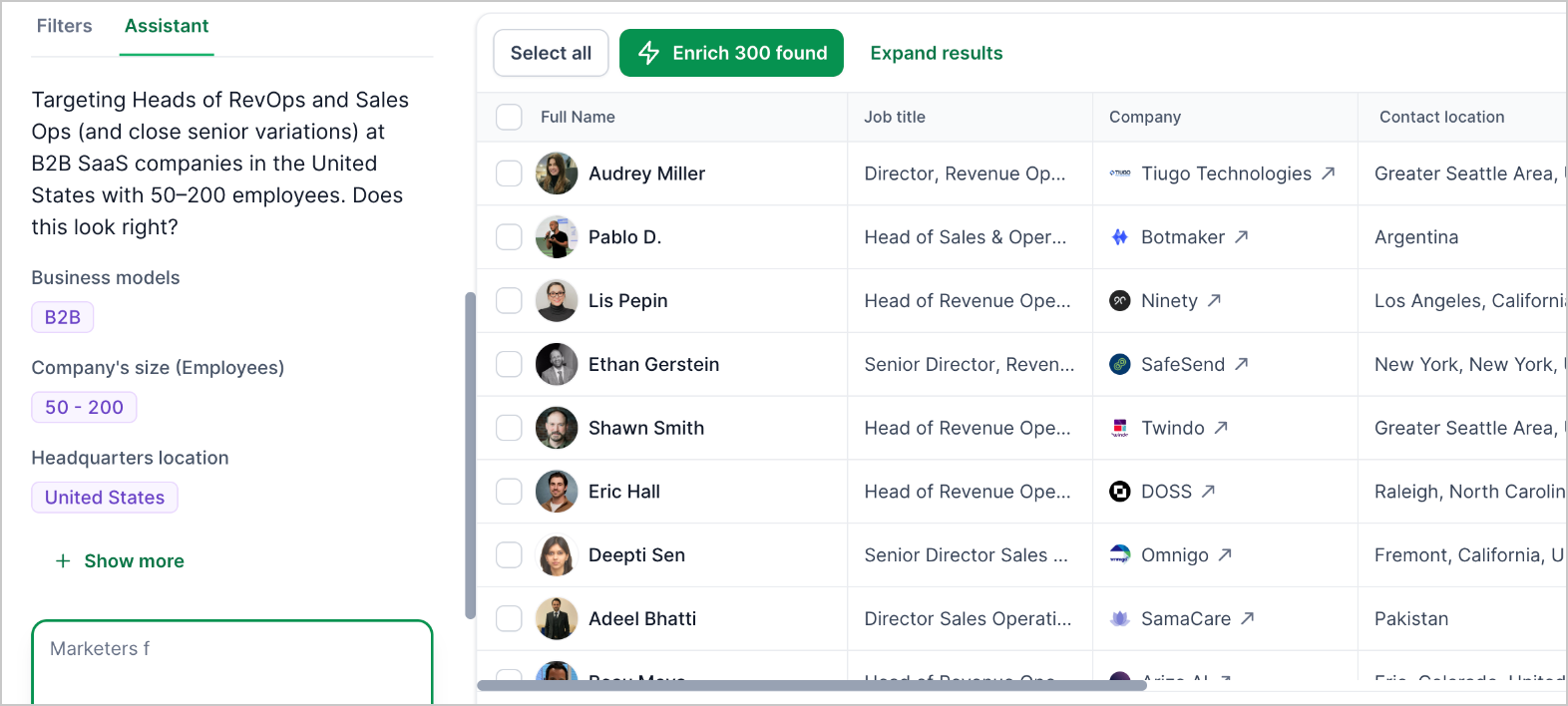
For this example, I picked Ideal customer profile, switched to the Assistant tab and typed: "Heads of RevOps and Sales Ops at B2B SaaS companies in the United States with 50 to 200 employees."
Here's what happened:
The Assistant restated who it was targeting and asked whether that looked right.
It set the filters for me: B2B business model, 50 to 200 employees, headquarters in the United States.
The table filled with matching people, showing name, title, company and location.
The green button changed to Enrich 300 found.
If I want more control, the Filters tab next to it has the full set: job titles, contact locations, headquarters, tenure, industries, company niches, business models, company keywords, contact languages, technologies and max contacts per company.
Step 3 (optional): Build the list from buying signals instead
When timing matters more than fit, I use Signals instead of an ICP search.
There are four types:
Job change signals: people who recently changed jobs, filtered by period, location, position, seniority and department.
Acquisition signals: companies that recently got acquired, filtered by location, category, headcount and founding year.
Funding signals: companies that recently raised money, filtered by round, amount, industry and headcount.
Investor signals: companies or people actively investing, filtered by headquarters, type and ticket size.
For company signals, Leadsforge first finds the matching companies, then pulls the relevant employees from its database. Every result also has a Details view showing the evidence for why it matched, which I use as a personalization hook in the first line of my email.
Step 4: Choose exactly which fields to enrich
Clicking Enrich gives me two options: Enrich contacts and Intent and signal.
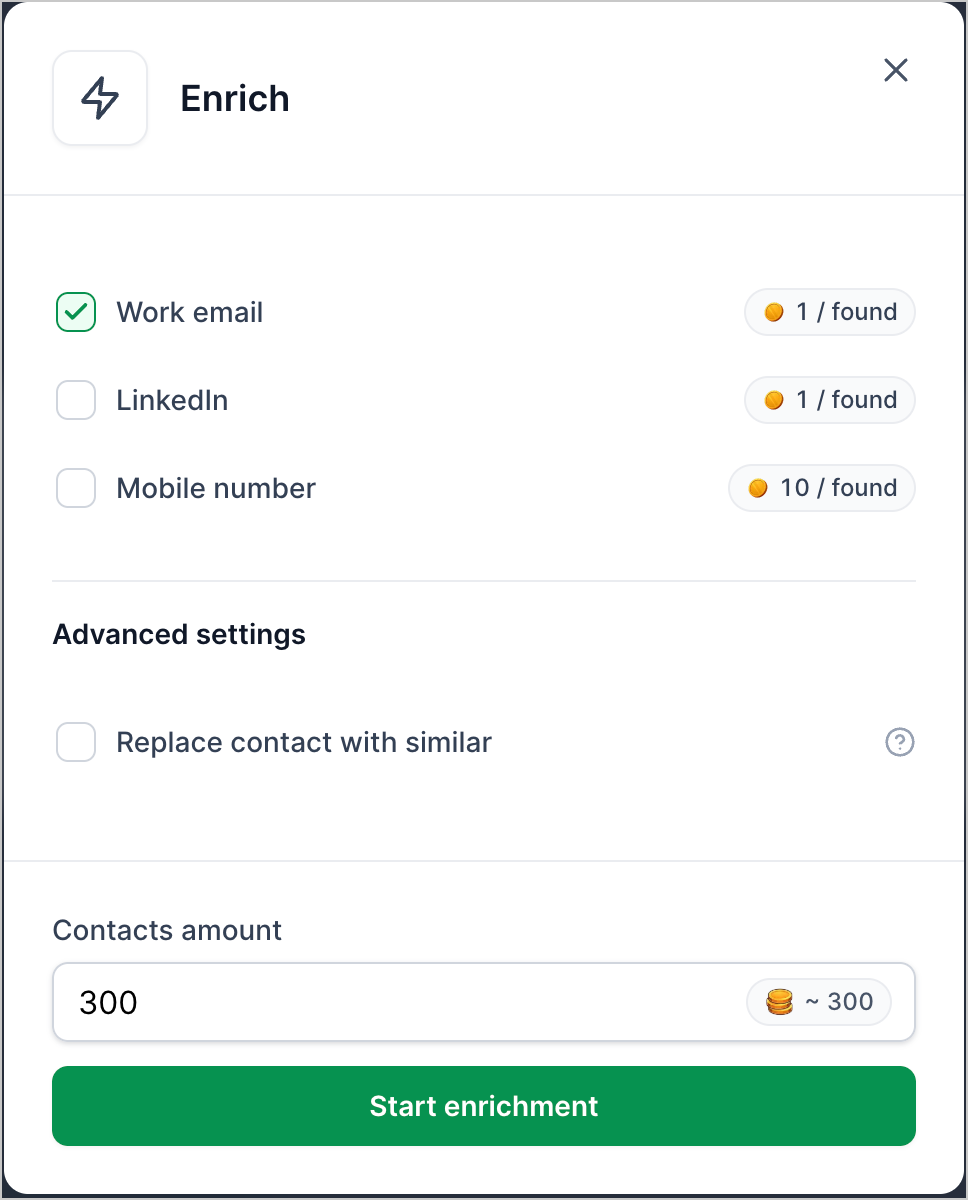
For contact data, I pick Enrich contacts and get this:
Tick the fields you need. Work email and LinkedIn cost 1 credit per result found. Mobile number costs 10.
Set the contacts amount. The credit estimate updates next to it, so I know the maximum spend before I start.
Decide on Replace contact with similar. If Leadsforge can't find details for a contact, this setting swaps in a similar contact from the same filters and enriches them instead, until it finds the data. I turn it on when I care about hitting a list size, and off when I need those exact people.
Click Start enrichment. Each contact now runs through Leadsforge's waterfall enrichment across 20+ providers.
Step 5 (optional): Add intent columns
The Intent and signal option lets me add custom intent columns. Leadsforge checks public sources to see whether each contact matches a criterion I set, and returns a yes or no answer with supporting details. It's handy for questions like "is this company hiring SDRs right now?" before I write a single email.
Step 6: Check what I actually spent
This is where the billing model earns its keep:
No credits are charged when nothing is found.
Contacts I've already enriched are skipped, so I never pay twice.
Unused credits never expire.
The Enrichments tab shows every job's status, how many contacts were processed, what came back and how many credits it used.
Step 7: Send the list where it's going
To a sequence: enriched contacts go straight into Salesforge with no CSV export in between.
To a spreadsheet: export as CSV.
To your own tools: use the Data Enrichment API, MCP server or CLI. With the MCP server, I can ask Claude or ChatGPT to run a search and enrichment for me.
While browsing LinkedIn: the Chrome extension enriches profiles on the fly using the same credits. New accounts get 100 free credits.
To your CRM: Leadsforge connects with the CRMs and tools most teams already use.
Step 8: Protect the domain you're sending from
Enrichment is only half the deliverability story.
Inside Salesforge:
Built-in email validation and Bounce Shield block risky addresses before they're sent.
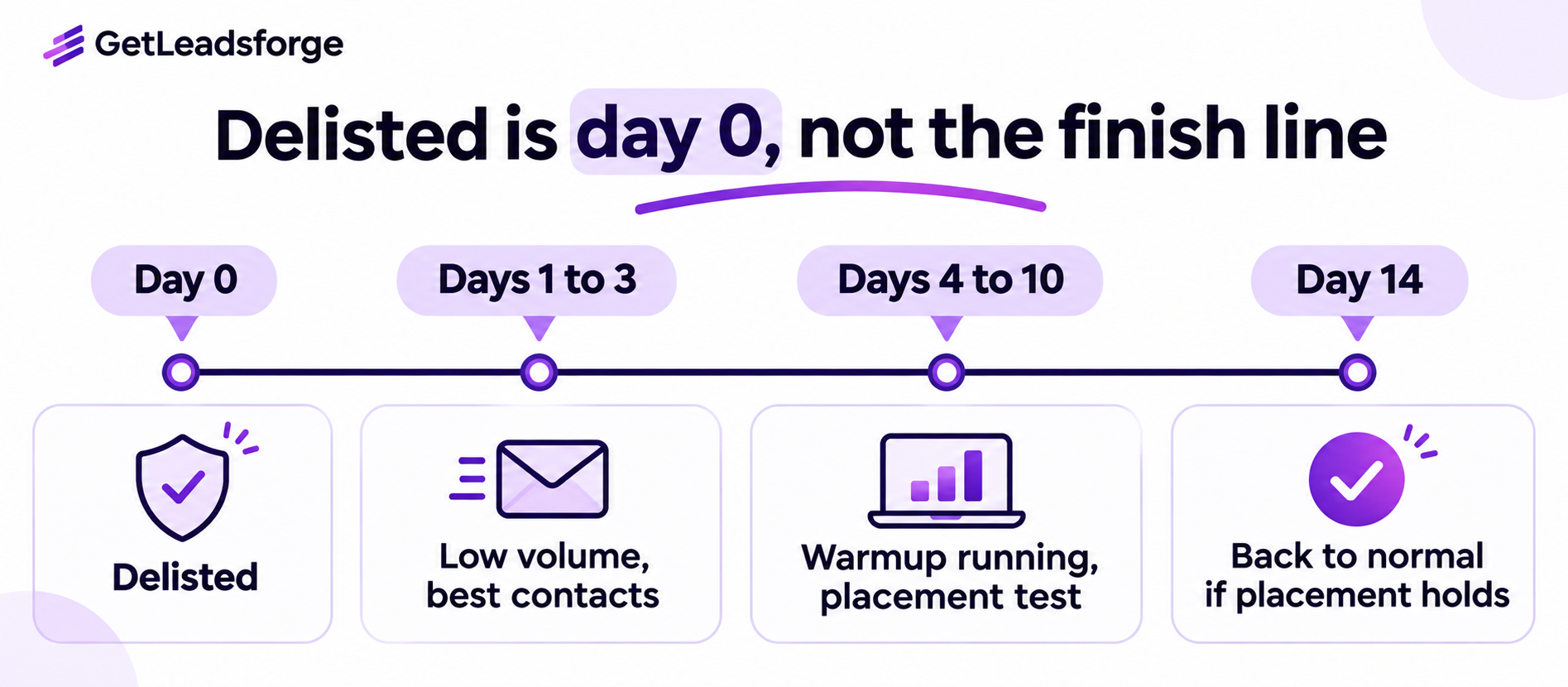
Every connected mailbox is warmed for free through Warmforge.
ESP matching sends Google to Google and Microsoft to Microsoft for better inbox placement.
See what the waterfall finds on your own list
Describe your ICP or upload a CSV, pick the fields you need and only pay for verified results. 100 free credits to start.
If you'd rather not build this yourself, these are the tools that come up most in practitioner conversations right now.
1. Leadsforge
An AI lead finder with a 500M+ contact database and a built-in waterfall across 20+ providers. You can build the list inside the tool (ICP chat, signals, lookalikes, followers, local search) or upload your own, then enrich and send it to Salesforge without exporting anything.
Best for: teams that want to find, enrich and send from one stack.
Watch out for: you don't hand-pick the provider order. Leadsforge manages it for you.
2. Clay
Less a waterfall tool and more a workflow builder with waterfalls inside it. You get a huge range of providers and full control over order, logic and fallback rules.
Best for: GTM engineers who enjoy building.
Watch out for: a real learning curve, and it's easy to burn credits while you figure out the setup.
3. FullEnrich
A dedicated email and phone waterfall across 20+ providers that only charges when it finds something. It splits results into statuses like deliverable, high probability and catch-all.
Best for: enriching lists you've built somewhere else.
Watch out for: it's enrichment only, so you'll need other tools for list building and sending.
4. Apollo
Started as a single database. According to its own help center, it now layers waterfall enrichment on top, pulling from Apollo's data plus connected third-party sources for emails and phone numbers.
Best for: teams already working inside Apollo.
Watch out for: older articles still describe it as single-source, so check the current setup.
5. BetterContact
A dedicated multi-source waterfall focused on emails and mobile numbers.
Best for: a simple, focused enrichment tool.
Watch out for: like FullEnrich, it doesn't cover list building or sending.
Comparison of Leadsforge, Clay, FullEnrich, Apollo, and BetterContact for waterfall enrichment
It isn't the right call for every team, and admitting that is part of using it well.
Your lists are tiny. If you work a few hundred contacts a month and can research the important ones by hand, a waterfall adds cost and setup for little gain. Hunter suggests lists under 1,000 contacts may not justify one.
You sell into one narrow, well-covered market. If one provider already finds 85% or more of your ICP, a second source might add only a handful of contacts.
You're doing true account-based work. With 30 to 50 target accounts, finding the right person matters more than filling an email column. Manual research wins.
You're in a heavily regulated space. If legal has to vet every data source, a long chain of providers creates more review work than it's worth.
The Forge Stack: From Enriched Lead to Booked Meeting
Enrichment is one step in outbound. Here's how it connects to everything that comes after it.
Most teams stitch outbound together from five or six vendors: one for data, one for enrichment, one for mailboxes, one for warmup, one for sending and another for LinkedIn.
The Forge Stack puts all of that under one roof, with one login (each product has its own subscription):
Leadsforge finds and enriches your leads, with waterfall enrichment and intent signals built in.
Salesforge runs cold email and LinkedIn in one sequence with if/then logic, AI personalization across 21+ languages, and every reply in Primebox™.
Warmforge warms every connected mailbox, free with Salesforge.
Mailforge, Infraforge and Primeforge give you three infrastructure options (shared, dedicated, or real Google Workspace and Microsoft 365 mailboxes) that you can switch between without migrating.
Agent Frank is an AI SDR who prospects from Leadsforge, enriches contacts, writes the messages, handles replies and books meetings around the clock.
You also choose who runs it: your own team, Agent Frank, or a Forge Expert agency on your behalf. Every Forge product also has an MCP server, so your own AI agents can operate the stack too. If you're rethinking your whole prospecting setup, my take on AI lead generation goes deeper.
Final Verdict
Here's where I land after running waterfalls on a lot of messy lists.
Waterfall enrichment is worth it for almost any team doing outbound at volume, especially across more than one region. It's the most reliable way I know to turn a half-empty list into one you can actually work. But it isn't a magic data fix, and the Reddit sceptics are right about that. The teams who get burned are the ones who stack six providers that share the same data, count catch-alls as wins and never check which source caused their bounces.
If you only remember five things from this guide, make it these:
Filter your list before you enrich it.
Keep email waterfalls to three or four providers that don't share upstream data.
Accept only verified results, and decide your catch-all rule in advance.
Run phone numbers separately, and only for contacts you'll call.
Log the source of every result, and pay per verified result wherever you can.
Fill the gaps in your next lead list
Build a list or upload your own, then let Leadsforge check 20+ providers for verified emails, mobile numbers and LinkedIn profiles.
Waterfall enrichment is a way of finding missing contact details by asking several data providers one after another. If the first provider can't find a verified email or phone number, the next one tries, and it stops as soon as one succeeds.
How is waterfall enrichment different from regular data enrichment?
Regular data enrichment usually pulls from one database, so you only get what that provider has. Waterfall enrichment chains several providers in a set order, which typically raises coverage from around 40% to 60% to 80% or more.
How many providers should a waterfall have?
For emails, three or four providers is usually the sweet spot. After that, each extra source finds very few new contacts, costs more per result and tends to bring in more risky data. Phone numbers are best handled in their own separate waterfall.
Does waterfall enrichment reduce bounce rates?
It can, but only with strict validation. More providers can actually raise bounces if catch-all and risky results are accepted. Accepting only verified results and handling catch-all addresses separately is what keeps bounce rates low.
What is a catch-all email and should I send to it?
A catch-all email sits on a mail server that accepts every address, so verification can't confirm the mailbox exists. Either drop catch-alls, send to them from a secondary domain at low volume, or send normally only if they're a small share of your list.
Is waterfall enrichment GDPR compliant?
A waterfall is only as compliant as its weakest data source. Check where each provider gets its data, how it handles opt-outs and whether it will sign a data processing agreement before using it for prospects in Europe.
How much does waterfall enrichment cost?
It depends on whether you pay per attempt or per result. Pay-per-result tools only charge when verified data comes back. In Leadsforge, verified work emails and LinkedIn profiles cost 1 credit each, mobile numbers cost 10, and nothing is charged when nothing is found.
Can I use waterfall enrichment for phone numbers?
Yes, and it's often where waterfalls help most, because mobile data is spread thinly across providers. Run phone enrichment as its own waterfall and only for contacts you plan to call, since phone lookups cost much more than emails.
Should I build my own waterfall or use a managed tool?
Build your own only if you have a GTM engineer and need full control over provider order and rules. Most teams are better off with a managed tool that handles provider contracts, verification and billing, and many also offer an API for custom pipelines.
What's the difference between Clay waterfall enrichment and a managed tool like Leadsforge?
Clay lets you build and control your own waterfall, including provider order and fallback rules, which suits teams with a GTM engineer. Leadsforge manages the waterfall for you across 20+ providers, charges only for verified results and sends contacts straight into Salesforge.